# ParcelParcel API documentation (all pages)
> Every page of https://www.parcelparcel.com/api-docs/ in one file. OpenAPI spec: https://www.parcelparcel.com/api-docs/openapi.json
---
Source: https://www.parcelparcel.com/api-docs/
# ParcelParcel API
> Compare shipping options, book shipments, get labels and track parcels from your own software.
With the ParcelParcel API you connect your own software (webshop, ERP or WMS) to your ParcelParcel account. You get the prices of your own account, and every shipment you create shows up in MyParcelParcel. The API works the same for accounts of ParcelParcel Netherlands B.V. and ParcelParcel Belgium BV.
## Base URL
All endpoints start with:
```text
https://services.parcelparcel.com/partners-api/v1
```
Every request needs two headers: `X-PP-API` with your API key and secret, and `Content-Type: application/json`. Every response is JSON with the same three elements: `errors`, `message` and `data` (see [General information](https://www.parcelparcel.com/api-docs/general-information/)).
## Quickstart
> [!tip] Start with your sandbox key
> On the same page you can generate a sandbox key (it starts with `sbx_`). Every call works with live rates and tracking, but bookings never go to the carrier and nothing is charged. [More about the sandbox](https://www.parcelparcel.com/api-docs/authentication/#test-with-your-sandbox-key).
1. **Get your API key and API secret.** Log in to MyParcelParcel and go to **Settings** → **Developers** → **API keys**. See [Authentication](https://www.parcelparcel.com/api-docs/authentication/). No account yet? [Create an account](https://my.parcelparcel.com/register).
2. **Compare shipping options.** Send the parcels, origin and destination to [Compare shipping options](https://www.parcelparcel.com/api-docs/compare-shipping-options/). You get the price and transit time per carrier, each with a `productId`.
3. **Create a shipment.** Send the addresses, parcels and content items to [Create a (draft) shipment](https://www.parcelparcel.com/api-docs/create-shipment/). Add the `productId` as `preferredShippingOption`, or leave it out and we pick the cheapest option. With `bookShipment: true` we book it directly and return the labels.
4. **Get the labels and track.** Fetch the labels with [Get the shipping documents](https://www.parcelparcel.com/api-docs/shipping-documents/) and follow the parcel with [Track a shipment](https://www.parcelparcel.com/api-docs/track-shipment/).
```bash cURL
curl --request POST 'https://services.parcelparcel.com/partners-api/v1/rates' \
--header 'X-PP-API: {YourAPIKey}@{YourAPISecret}' \
--header 'Content-Type: application/json' \
--data-raw '{
"parcels": [
{
"type": "NONDOC",
"weight": "8.3",
"height": "21",
"width": "25",
"length": "65",
"count": "1"
}
],
"fromCountry": "NL",
"toCountry": "US",
"recipientType": "business"
}'
```
## Endpoints
- `GET /me` [Check your API key](https://www.parcelparcel.com/api-docs/me/): See which ParcelParcel account your API key belongs to.
- `POST /rates` [Compare shipping options](https://www.parcelparcel.com/api-docs/compare-shipping-options/): Get shipping rates from ParcelParcel
- `POST /shipments` [Create a (draft) shipment](https://www.parcelparcel.com/api-docs/create-shipment/): Create a draft shipment or book your shipment directly in ParcelParcel.
- `POST /shipments/{shipmentId}/cancel` [Cancel a (draft) shipment](https://www.parcelparcel.com/api-docs/cancel-shipment/): Cancel a (draft) shipment directly in ParcelParcel.
- `GET /track/{trackingNumber}` [Track a shipment](https://www.parcelparcel.com/api-docs/track-shipment/): Track shipments that are booked through MyParcelParcel.
- `GET /shipments` [List your shipments](https://www.parcelparcel.com/api-docs/list-shipments/): Retrieve and filter all shipments linked to your ParcelParcel account.
- `GET /shipments/{shipmentId}/labels` [Get the shipping documents (labels)](https://www.parcelparcel.com/api-docs/shipping-documents/): Receive the shipping documentation in a base64 string.
- `POST /duties-taxes-estimate` [Estimate duties/taxes](https://www.parcelparcel.com/api-docs/estimate-duties-taxes/): Estimate the import duties and taxes of a shipment.
- `GET /dutiable-route/{countryFrom}/{countryTo}/{parcelType}` [Check if a shipment goes through customs](https://www.parcelparcel.com/api-docs/dutiable-route/): Find out if a shipment between two countries is dutiable, before you create it.
- `POST /hooks/subscribe` [Webhooks](https://www.parcelparcel.com/api-docs/webhooks/): Get a message on your own URL as soon as a shipment is booked.
## For AI agents and code generators
- **[OpenAPI spec](/api-docs/openapi.json)** (also as [YAML](/api-docs/openapi.yaml)): every endpoint, field, required value and example in OpenAPI 3.1. Use it to generate a client, to give an AI agent the API as tools, or to import it in Postman or Insomnia.
- **[llms.txt](/api-docs/llms.txt)** and **[llms-full.txt](/api-docs/llms-full.txt)**: these docs for language models, as an index or all pages in one file. Every page is also available as markdown with the **Markdown** button.
- **[MCP server](https://www.parcelparcel.com/api-docs/mcp/)**: let Claude or ChatGPT compare rates and book shipments for you, without writing code.
## Other ways to connect
- **[MCP for Claude or ChatGPT](https://www.parcelparcel.com/api-docs/mcp/)**: compare rates, book, get labels and track from the chat.
- **[Postman Collection](https://www.parcelparcel.com/api-docs/postman-collection/)**: every request ready to try, without writing code.
- **[Webhooks](https://www.parcelparcel.com/api-docs/webhooks/)**: get a message when a shipment is created or booked.
Questions about the API? See [Support](https://www.parcelparcel.com/api-docs/support/).
---
Source: https://www.parcelparcel.com/api-docs/authentication/
# Authentication
> Get your API key and secret, and test safely with your sandbox key.
Every request needs your **API Key** and **API Secret**. You find both in MyParcelParcel, together with a separate sandbox pair to test your integration without booking real shipments.
## Get your API key and secret
1. **Log in** to [MyParcelParcel](https://my.parcelparcel.com/login). Don't have an account? [Create one here](https://my.parcelparcel.com/register).
2. Click **Settings** at the bottom of the menu on the left.
3. Under **Developers**, click **API keys**. You can also go there directly: [my.parcelparcel.com/account/partners-api](https://my.parcelparcel.com/account/partners-api).
4. No credentials yet? Click **Generate API credentials**.
5. Click **Copy** next to your **API Key** and **API Secret**.
*(Screen: MyParcelParcel, Settings > Developers > API keys: your API Key and API Secret with a Copy button, and under 'Test your integration' the separate sandbox key pair)*
> [!note] Don't see API keys under Settings?
> API access is for business accounts. If **API keys** is missing under Developers, email [integrations@italogistics.com](mailto:integrations@italogistics.com) and we'll check your account.
## Put your credentials in the request
Add your API Key and API Secret to the `X-PP-API` header of every request, with an `@` between them:
| Name | Value |
| :------- | :------------------ |
| X-PP-API | `{YourAPIKey}@{YourAPISecret}` |
So it could look something like this:
```http
X-PP-API: nube0b:1pdahsptd10kw848cccgkckogcgss0@0gw0ssw4-g4ks00ko-48w0sosc-cckw
```
## Test with your sandbox key
Under **Test your integration** on the same page, click **Generate sandbox key**. You get a second key pair; the sandbox API Key starts with `sbx_`. Use it in the `X-PP-API` header exactly like your live key.
With the sandbox key:
- **Rates, tracking, duties and all other calls use live data**, so you test against real prices and transit times.
- **Shipments are never sent to the carrier.** You can create drafts and even book with `bookShipment: true`: you get a sample label and a test tracking number (`SANDBOX` followed by the shipment id), and nothing is charged.
- **Cancelling** a sandbox shipment only cancels it in your account.
- Sandbox shipments show up in **API shipments** in MyParcelParcel with a **Sandbox** badge.
A booking made with the sandbox key returns the same response as a real booking, with `"sandbox": true`:
```json
{
"errors": [],
"message": "Your shipment has been booked (sandbox: not sent to the carrier)",
"data": {
"id": 1588448,
"status": "created_at_carrier",
"carrier": "FedEx",
"product": "FedEx - FedEx Economy",
"productId": 79,
"price": 86.41,
"trackingNumber": "SANDBOX1588448",
"trackingUrl": null,
"labels": "=== base64 encoded sample label ===",
"sandbox": true
}
}
```
When your integration works, swap the sandbox key for your live key. Nothing else changes.
## Rotate your credentials
Click **Rotate credentials** to get a new key and secret, for example on a routine schedule or right away if your credentials may have been exposed. Your current pair stops working immediately, and the new pair is shown only once, so copy it straight away and update your integration. The sandbox pair has its own **Rotate sandbox key** button.
## Test your authentication
The quickest test is [Check your API key](https://www.parcelparcel.com/api-docs/me/): it returns the email address of the account your key belongs to, or `X-PP-API header not valid` if something is wrong. After that, try [Compare shipping options](https://www.parcelparcel.com/api-docs/compare-shipping-options/) with your sandbox key, or import the whole [Postman Collection](https://www.parcelparcel.com/api-docs/postman-collection/).
---
Source: https://www.parcelparcel.com/api-docs/general-information/
# General information
> Some basic information regarding our API.
In this section, you can read some general information.
## Headers
Headers must include the following
| Name | Value |
| :----------- | :----------------------------- |
| X-PP-API | {YourAPIKey}@{YourAPISecret} |
| Content-Type | application/json |
You can read the instructions on how to get your *API Key* and *API Secret* on our [Authentication page](https://www.parcelparcel.com/api-docs/authentication/).
## Response
Each JSON response will contain the following 3 elements
| Name | Value |
| :------ | :---------------------------------------------- |
| errors | (bool) true \|\| false |
| message | string |
| data | (any) will contain data relevant to the request |
> [!success] Successful Response
```json
{
"errors": false,
"message": "Informative message ...",
"data": {
"property1": "value1",
"property2": "value2",
...
...
...
}
}
```
> [!error] Error Response
```json
{
"errors": true,
"message": "No route found for \"GET /partners-api/v1/undefined-route\""
}
```
---
Source: https://www.parcelparcel.com/api-docs/postman-collection/
# Postman Collection
> Import our Postman Collection and try every endpoint without writing code.
Our Postman Collection contains a ready-made request for every endpoint, with the same examples as these docs.
## What is Postman?
[Postman](https://www.postman.com/) is an API platform for building and using APIs. You can download Postman on [this page](https://www.postman.com/downloads/).
## Import the collection
1. Download the collection: [parcelparcel-api.postman_collection.json](/api-docs/parcelparcel-api.postman_collection.json).
2. In Postman, click **Import** and drop the file in the window. You can also paste this link in the Import window:
```text
https://www.parcelparcel.com/api-docs/parcelparcel-api.postman_collection.json
```
3. Open the **ParcelParcel API** collection and go to the **Variables** tab. Fill in your own `apiKey` and `apiSecret`. Tip: start with your sandbox key. Don't know where to find them? Check our [Authentication](https://www.parcelparcel.com/api-docs/authentication/) page.
4. Open a request and click **Send**.
The collection has a folder per endpoint. For [Cancel a shipment](https://www.parcelparcel.com/api-docs/cancel-shipment/) and [Get the shipping documents](https://www.parcelparcel.com/api-docs/shipping-documents/), set the `shipmentId` variable to the `id` you got when you created the shipment. For [Track a shipment](https://www.parcelparcel.com/api-docs/track-shipment/), set `trackingNumber`.
> [!warning] Booking is for real
> The request "Parcel shipment (booked directly)" has `bookShipment: true`. With your live key, sending it books a real shipment at the carrier on your account. Use your [sandbox key](https://www.parcelparcel.com/api-docs/authentication/#test-with-your-sandbox-key) to try it safely: nothing is sent to the carrier. The other create requests only make a draft.
---
Source: https://www.parcelparcel.com/api-docs/postman-guide/
# How to easily test a request in Postman
> Copy a cURL example from these docs, paste it in Postman and send your first request.
Every endpoint page starts with an **Example request**. Its cURL tab is a complete request: method, URL, headers and body. Postman turns it into a request for you, so you don't have to type anything over.
## What is Postman?
[Postman](https://www.postman.com/) is an API platform for building and using APIs. You can download Postman on [this page](https://www.postman.com/downloads/).
## Import a cURL example
1. Open an endpoint, for example [Compare shipping options](https://www.parcelparcel.com/api-docs/compare-shipping-options/).
2. In the **Example request**, choose the **cURL** tab and click **Copy**.
3. In Postman, click **Import** at the top left and paste the cURL in the box. You can also paste it straight into the URL bar of a new request.
4. Postman creates the request with the method, headers and body filled in.
5. In the **Headers** tab, replace `{YourAPIKey}@{YourAPISecret}` in the `X-PP-API` header with your own API key and secret. Don't know where to find them? Check our [Authentication](https://www.parcelparcel.com/api-docs/authentication/) page.
6. Click **Send**.
> [!tip] Want every request at once?
> Import our [Postman Collection](https://www.parcelparcel.com/api-docs/postman-collection/). It has a ready-made request for every endpoint, and you fill in your API key and secret only once.
## Other ways to copy a request
- **Body**: only the JSON body, for when you already have a request set up and want to try another example.
- **JavaScript** and **Python**: the same request as code, ready to paste in your own project.
- **HTTP**: the raw request, as it goes over the line.
---
Source: https://www.parcelparcel.com/api-docs/me/
# Check your API key
> See which ParcelParcel account your API key belongs to.
`GET https://services.parcelparcel.com/partners-api/v1/me`
This endpoint returns the account that your API key belongs to. It has no body and changes nothing, so it's the quickest way to check that your credentials work before you build anything else.
It's also handy when your integration connects several ParcelParcel accounts: call it to show your user which account is connected.
## Header
You need to add the following headers:
| Name | Value |
| :----------- | :----------------------------- |
| Content-Type | application/json |
| X-PP-API | `{YourAPIKey}@{YourAPISecret}` |
Don't you have an API Key and API Secret yet? Check our [Authentication](https://www.parcelparcel.com/api-docs/authentication/) page.
## Body
There is no body and there are no parameters.
## Response
| Name | Value | Comments |
| :------------ | :------- | :------------------------------------------------------------- |
| errors | (bool) | `false` when your credentials work. |
| message | (string) | `Query processed successfully` |
| data.username | (string) | The email address of the ParcelParcel account the key belongs to. |
Your live key and your [sandbox key](https://www.parcelparcel.com/api-docs/authentication/#test-with-your-sandbox-key) belong to the same account, so both return the same `username`.
### Example response
```json
{
"errors": false,
"message": "Query processed successfully",
"data": {
"username": "shipping@yourcompany.com"
}
}
```
### When the key is wrong
If the `X-PP-API` header is missing, or the key or secret is wrong, you don't get JSON back but the text:
```text
X-PP-API header not valid
```
Check that the header has the form `{YourAPIKey}@{YourAPISecret}`, with an `@` between them and no spaces. Did you just [rotate your credentials](https://www.parcelparcel.com/api-docs/authentication/#rotate-your-credentials)? Then the old pair no longer works.
## Examples
Don't know how to test these requests? Check [our guide](https://www.parcelparcel.com/api-docs/postman-guide/).
### Request example - Check which account your key belongs to
```bash cURL
curl --location --request GET 'https://services.parcelparcel.com/partners-api/v1/me' \
--header 'X-PP-API: {YourAPIKey}@{YourAPISecret}' \
--header 'Content-Type: application/json'
```
```http HTTP
GET /partners-api/v1/me HTTP/1.1
Host: services.parcelparcel.com
X-PP-API: {YourAPIKey}@{YourAPISecret}
Content-Type: application/json
```
---
Source: https://www.parcelparcel.com/api-docs/compare-shipping-options/
# Compare shipping options
> Get shipping rates from ParcelParcel
`POST https://services.parcelparcel.com/partners-api/v1/rates`
This endpoint allows you to return our shipping options based on a couple of parameters. We return the price (based on your own ParcelParcel account) per shipping option and the corresponding transit time.
See the [examples](#examples) for complete requests and responses.
## Header
You need to add the following headers:
| Name | Value |
| :----------- | :----------------------------- |
| Content-Type | application/json |
| X-PP-API | `{YourAPIKey}@{YourAPISecret}` |
Don't you have an API Key and API Secret yet? Check our [Authentication](https://www.parcelparcel.com/api-docs/authentication/) page and how to get them in under a minute.
## Body
The Request body must contain a JSON structure with the following definition
| Name | Value | Required | Comments |
| :------------ | :-------------------- | :------- | :---------------------------------------------------------------------------------------------------------------------------------------------------------------------------------------------------------------------------- |
| parcels | (object array) [Parcel](#parcel-type) | true | More information is below. Currently, you can compare shipping options for a document, parcel or pallet shipment. |
| fromCountry | | true | You should provide the country in ISO-2 format (e.g. NL or US) |
| fromZipcode | | false | Please note, that if you don't provide a zipcode or city, we use the capital to calculate the shipping rate and transit time. |
| fromCity | | false | Please note, that if you don't provide a zipcode or city, we use the capital to calculate the shipping rate and transit time. |
| toCountry | | true | You should provide the country in ISO-2 format (e.g. NL or US) |
| toZipcode | | false | Please note, that if you don't provide a zipcode or city, we use the capital to calculate the shipping rate and transit time. |
| toCity | | false | Please note, that if you don't provide a zipcode or city, we use the capital to calculate the shipping rate and transit time. |
| insured | (bool) | false | Use this element to state if you want to insure your shipment or not. Please note, if you set this element to *true*, you also need to specify the *totalValue* element since it's required to calculate the insurance costs. |
| totalValue | number | false | Define the total value of your shipment in euros (€). This is needed to calculate the insurance costs. |
| recipientType | | false | The value is either *individual* or *business*. This value is required when you specify the type as *PALLET*. |
### Example Body
```json
{
"parcels": [
{
"type": "NONDOC",
"weight": "1.5",
"height": "10",
"width": "10",
"length": "10",
"count": "1"
}
],
"fromCountry": "NL",
"fromZipcode": "1411 AT",
"fromCity": "Naarden",
"toCountry": "US",
"toZipcode": "10001",
"toCity": "New York",
"insured": true,
"totalValue": 100
}
```
### Parcel type
| Name | Value | Required | Comments |
| :-------- | :------------------ | :------- | :------------------------------------------------------------------------------------------------------------------------------------------------------------------------- |
| type | NONDOC, DOC, PALLET | true | You should choose *NONDOC* if you're shipping a parcel. *DOC* for a document shipment and *PALLET* for a pallet. It's not possible to combine multiple types of shipments. |
| weight | 1 decimal | true | For example "10" or "15.2". Please note, that the weight is only required for *NONDOC* and *PALLET* shipments. This value should be stated in kilograms (kg). |
| length | integer | true | For example "40". Please note, that the length is only required for *NONDOC* and *PALLET* shipments. This value should be stated in centimetres (cm). |
| width | integer | true | For example "30". Please note, that the width is only required for *NONDOC* and *PALLET* shipments. This value should be stated in centimetres (cm). |
| height | integer | true | For example "20". Please note, that the height is only required for *NONDOC* and *PALLET* shipments. This value should be stated in centimetres (cm). |
| count | integer | true | For example "1". Please note, that the count is required for *DOC*, *NONDOC* and *PALLET* shipments. |
| stackable | (bool) | true | This is only needed when your *type* is equal to *PALLET*. |
#### Example NONDOC (Parcel):
```json
{
"type": "NONDOC",
"weight": "8.3",
"height": "21",
"width": "25",
"length": "65",
"count": "1"
}
```
#### Example DOC (Document):
```json
{
"type": "DOC",
"count": "1"
}
```
#### Example PALLET (Pallet shipment):
```json
{
"type": "PALLET",
"weight": "80",
"height": "120",
"width": "120",
"length": "100",
"count": "1",
"stackable": false
}
```
## Response
The following response elements are returned:
| Name | Value | Comments |
| :--- | :--- | :--- |
| carrier | string | The carrier of the shipping option. Currently, we offer shipping options from the following carriers: FedEx DHL, TNT, DPD, DSV and Skynet. |
| product | string | The type of product (e.g. FedEx Economy or FedEx Priority) |
| price | number | The price is returned in euros (€), without VAT and with 2 decimals (e.g. 20.20). If you set the insurance to true, we also include the insurance costs in this price.
Please note, that some surcharges (e.g. *the remote area surcharge*) depend on the zip code/city of the pick-up and/or destination address. You can read more information about surcharges [on this page](https://www.parcelparcel.com/nl_NL/surcharge-information/). |
| minEstimatedTransitTimeInWorkingsDays | integer | The minimum estimated transit time of a shipping option is in working days. |
| maxEstimatedTransitTimeInWorkingsDays | integer | The maximum estimated transit time of a shipping option is in working days. |
| productId | number | You can use the *productId* if you want to [create a draft shipment](https://www.parcelparcel.com/api-docs/create-shipment/) with a specific shipping option. You can do this with the *preferredShippingOption* element (/draft endpoint). |
| priceBreakdown | array | This is a breakdown of how the price is built up. |
| priceBreakdown.item | string | This is an item of the price breakdown. |
| priceBreakdown.amount | number | This is the amount of the item in the price breakdown. |
| priceBreakdown.reason | string | For surcharges, we add the reason why a surcharge is applied. |
Please note, that we always return the cheapest option first in the response.
## Examples
Below, we have created multiple examples so you are up and running ASAP. Don't know how to test these requests? Check [our guide](https://www.parcelparcel.com/api-docs/postman-guide/).
### Request example - Get shipping options for a parcel shipment from the Netherlands to the United States
```bash cURL
curl --location --request POST 'https://services.parcelparcel.com/partners-api/v1/rates' \
--header 'X-PP-API: {YourAPIKey}@{YourAPISecret}' \
--header 'Content-Type: application/json' \
--data-raw '{
"parcels": [
{
"type": "NONDOC",
"weight": "1.5",
"height": "10",
"width": "10",
"length": "10",
"count": "1"
}
],
"fromCountry": "NL",
"fromZipcode": "1411 AT",
"fromCity": "Naarden",
"toCountry": "US",
"toZipcode": "10001",
"toCity": "New York",
"insured": true,
"totalValue": 100
}'
```
```http HTTP
POST /partners-api/v1/rates HTTP/1.1
Host: services.parcelparcel.com
X-PP-API: {YourAPIKey}@{YourAPISecret}
Content-Type: application/json
{
"parcels": [
{
"type": "NONDOC",
"weight": "1.5",
"height": "10",
"width": "10",
"length": "10",
"count": "1"
}
],
"fromCountry": "NL",
"fromZipcode": "1411 AT",
"fromCity": "Naarden",
"toCountry": "US",
"toZipcode": "10001",
"toCity": "New York",
"insured": true,
"totalValue": 100
}
```
Don't forget to change the **X-PP-API** element in the header for this request to work. Don't know where to get your API Key and API Secret? Check our [Authentication](https://www.parcelparcel.com/api-docs/authentication/) page and how to get them in under a minute.
### Response example - Get shipping options for a parcel shipment from the Netherlands to the United States
```json
{
"errors": false,
"message": "Rates successfully processed",
"data": [
{
"carrier": "DHL",
"product": "DHL Express Worldwide",
"productId": 74,
"price": 84.08,
"minEstimatedTransitTimeInWorkingsDays": 6,
"maxEstimatedTransitTimeInWorkingsDays": 7,
"priceBreakdown": [
{
"item": "DHL Express Worldwide",
"amount": 84.08
}
]
},
{
"carrier": "FedEx",
"product": "FedEx Economy",
"productId": 79,
"price": 90,
"minEstimatedTransitTimeInWorkingsDays": 8,
"maxEstimatedTransitTimeInWorkingsDays": 9,
"priceBreakdown": [
{
"item": "FedEx Economy",
"amount": 90
}
]
},
{
"carrier": "FedEx",
"product": "FedEx Priority",
"productId": 80,
"price": 94.36,
"minEstimatedTransitTimeInWorkingsDays": 3,
"maxEstimatedTransitTimeInWorkingsDays": 4,
"priceBreakdown": [
{
"item": "FedEx Priority",
"amount": 94.36
}
]
},
{
"carrier": "DHL",
"product": "DHL Express 12:00",
"productId": 78,
"price": 112.88,
"minEstimatedTransitTimeInWorkingsDays": 5,
"maxEstimatedTransitTimeInWorkingsDays": 6,
"priceBreakdown": [
{
"item": "DHL Express 12:00",
"amount": 112.88
}
]
},
{
"carrier": "TNT",
"product": "TNT Express",
"productId": 95,
"price": 130.55,
"minEstimatedTransitTimeInWorkingsDays": 6,
"maxEstimatedTransitTimeInWorkingsDays": 7,
"priceBreakdown": [
{
"item": "TNT Express",
"amount": 130.55
}
]
},
{
"carrier": "DHL",
"product": "DHL Express 10:30",
"productId": 113,
"price": 134.54,
"minEstimatedTransitTimeInWorkingsDays": 5,
"maxEstimatedTransitTimeInWorkingsDays": 6,
"priceBreakdown": [
{
"item": "DHL Express 10:30",
"amount": 134.54
}
]
}
]
}
```
### Request example - Get shipping options for a document shipment from the Netherlands to the United States
```bash cURL
curl --location --request POST 'https://services.parcelparcel.com/partners-api/v1/rates' \
--header 'X-PP-API: {YourAPIKey}@{YourAPISecret}' \
--header 'Content-Type: application/json' \
--data-raw '{
"parcels": [
{
"type": "DOC",
"count": "1"
}
],
"fromCountry": "NL",
"fromZipcode": "1411 AT",
"fromCity": "Naarden",
"toCountry": "US",
"toZipcode": "10001",
"toCity": "New York",
"insured": false,
"totalValue": 100
}'
```
```http HTTP
POST /partners-api/v1/rates HTTP/1.1
Host: services.parcelparcel.com
X-PP-API: {YourAPIKey}@{YourAPISecret}
Content-Type: application/json
{
"parcels": [
{
"type": "DOC",
"count": "1"
}
],
"fromCountry": "NL",
"fromZipcode": "1411 AT",
"fromCity": "Naarden",
"toCountry": "US",
"toZipcode": "10001",
"toCity": "New York",
"insured": false,
"totalValue": 100
}
```
Don't forget to change the **X-PP-API** element in the header for this request to work. Don't know where to get your API Key and API Secret? Check our [Authentication](https://www.parcelparcel.com/api-docs/authentication/) page and how to get them in under a minute.
### Response example - Get shipping options for a document shipment from the Netherlands to the United States
```json
{
"errors": false,
"message": "Rates successfully processed",
"data": [
{
"carrier": "DHL",
"product": "DHL Express 12:00",
"productId": 78,
"price": 55.27,
"minEstimatedTransitTimeInWorkingsDays": 7,
"maxEstimatedTransitTimeInWorkingsDays": 8,
"priceBreakdown": [
{
"item": "DHL Express 12:00",
"amount": 55.27
}
]
},
{
"carrier": "DHL",
"product": "DHL Express Worldwide",
"productId": 74,
"price": 59.98,
"minEstimatedTransitTimeInWorkingsDays": 7,
"maxEstimatedTransitTimeInWorkingsDays": 8,
"priceBreakdown": [
{
"item": "DHL Express Worldwide",
"amount": 59.98
}
]
},
{
"carrier": "FedEx",
"product": "FedEx Priority",
"productId": 80,
"price": 65.61,
"minEstimatedTransitTimeInWorkingsDays": 5,
"maxEstimatedTransitTimeInWorkingsDays": 6,
"priceBreakdown": [
{
"item": "FedEx Priority",
"amount": 65.61
}
]
},
{
"carrier": "TNT",
"product": "TNT Express",
"productId": 95,
"price": 66.68,
"minEstimatedTransitTimeInWorkingsDays": 5,
"maxEstimatedTransitTimeInWorkingsDays": 6,
"priceBreakdown": [
{
"item": "TNT Express",
"amount": 66.68
}
]
},
{
"carrier": "DHL",
"product": "DHL Express 10:30",
"productId": 113,
"price": 68.06,
"minEstimatedTransitTimeInWorkingsDays": 7,
"maxEstimatedTransitTimeInWorkingsDays": 8,
"priceBreakdown": [
{
"item": "DHL Express 10:30",
"amount": 68.06
}
]
}
]
}
```
### Request example - Get shipping options for a pallet shipment from the Netherlands to the United States
```bash cURL
curl --location --request POST 'https://services.parcelparcel.com/partners-api/v1/rates' \
--header 'X-PP-API: {YourAPIKey}@{YourAPISecret}' \
--header 'Content-Type: application/json' \
--data-raw '{
"parcels": [
{
"type": "PALLET",
"weight": "80",
"height": "120",
"width": "120",
"length": "100",
"count": "1",
"stackable": false
}
],
"recipientType": "business",
"fromCountry": "NL",
"fromZipcode": "1411 AT",
"fromCity": "Naarden",
"toCountry": "NL",
"toZipcode": "1052LP",
"toCity": "Amsterdam",
"insured": false,
"totalValue": 100
}'
```
```http HTTP
POST /partners-api/v1/rates HTTP/1.1
Host: services.parcelparcel.com
X-PP-API: {YourAPIKey}@{YourAPISecret}
Content-Type: application/json
{
"parcels": [
{
"type": "PALLET",
"weight": "80",
"height": "120",
"width": "120",
"length": "100",
"count": "1",
"stackable": false
}
],
"recipientType": "business",
"fromCountry": "NL",
"fromZipcode": "1411 AT",
"fromCity": "Naarden",
"toCountry": "NL",
"toZipcode": "1052LP",
"toCity": "Amsterdam",
"insured": false,
"totalValue": 100
}
```
Don't forget to change the **X-PP-API** element in the header for this request to work. Don't know where to get your API Key and API Secret? Check our [Authentication](https://www.parcelparcel.com/api-docs/authentication/) page and how to get them in under a minute.
### Response example - Get shipping options for a pallet shipment within the Netherlands (domestic)
```json
{
"errors": false,
"message": "Rates successfully processed",
"data": [
{
"carrier": "DSV",
"product": "DSV Road Domestic",
"productId": 114,
"price": 67.05,
"minEstimatedTransitTimeInWorkingsDays": 1,
"maxEstimatedTransitTimeInWorkingsDays": 2,
"priceBreakdown": [
{
"item": "DSV Road Domestic",
"amount": 67.05
}
]
},
{
"carrier": "TNT",
"product": "TNT Express domestic",
"productId": 102,
"price": 300.02,
"minEstimatedTransitTimeInWorkingsDays": 5,
"maxEstimatedTransitTimeInWorkingsDays": 6,
"priceBreakdown": [
{
"item": "TNT Express domestic",
"amount": 300.02
}
]
},
{
"carrier": "TNT",
"product": "TNT Domestic 12:00",
"productId": 103,
"price": 312.51,
"minEstimatedTransitTimeInWorkingsDays": 5,
"maxEstimatedTransitTimeInWorkingsDays": 6,
"priceBreakdown": [
{
"item": "TNT Domestic 12:00",
"amount": 312.51
}
]
},
{
"carrier": "DHL",
"product": "DHL Express Domestic",
"productId": 105,
"price": 948.58,
"minEstimatedTransitTimeInWorkingsDays": 5,
"maxEstimatedTransitTimeInWorkingsDays": 6,
"priceBreakdown": [
{
"item": "DHL Express Domestic",
"amount": 948.58
}
]
},
{
"carrier": "DHL",
"product": "DHL Express 12:00",
"productId": 78,
"price": 1156.87,
"minEstimatedTransitTimeInWorkingsDays": 5,
"maxEstimatedTransitTimeInWorkingsDays": 6,
"priceBreakdown": [
{
"item": "DHL Express 12:00",
"amount": 1156.87
}
]
}
]
}
```
---
Source: https://www.parcelparcel.com/api-docs/create-shipment/
# Create a (draft) shipment
> Create a draft shipment or book your shipment directly in ParcelParcel.
`POST https://services.parcelparcel.com/partners-api/v1/shipments`
This endpoint allows you to create draft shipments or book shipments directly. These shipments will be visible in the [API shipments](https://my.parcelparcel.com/#!/shipment/draft) section in your ParcelParcel account if you create them as a draft.
If you successfully created the draft shipment, it will look like this:
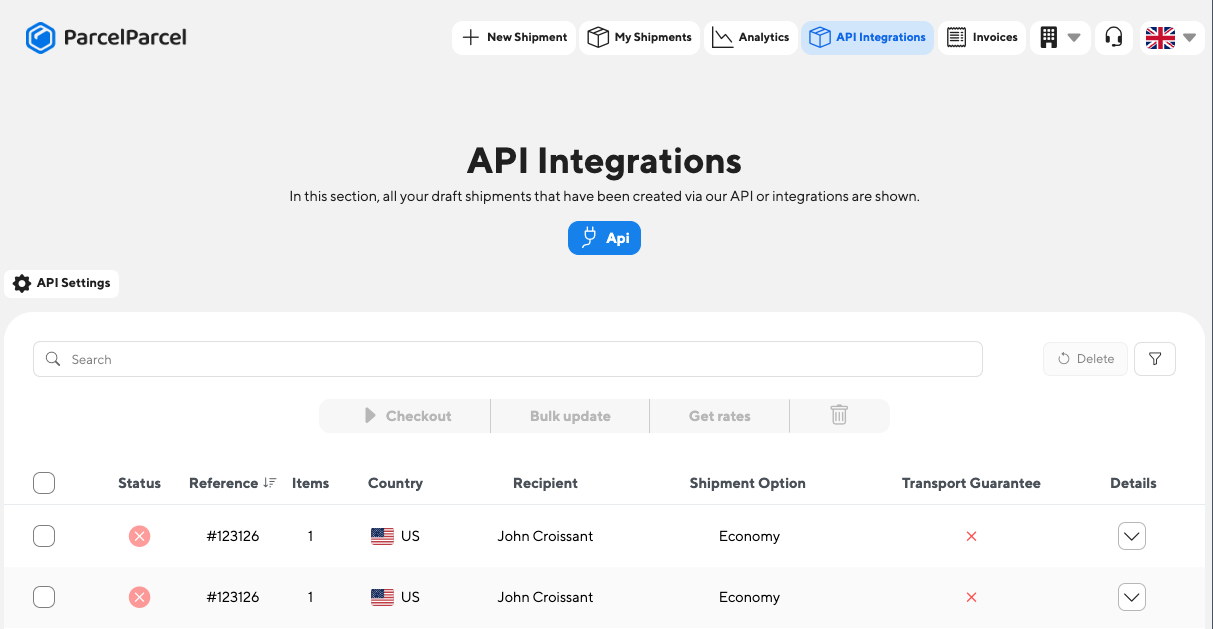
If you decide to create a draft shipment, you can still edit all the information of your draft shipment and decide to book the shipment to get the labels in API shipments. The *bookShipment* element in the body defines if you just want to create a draft or want to book it directly. If you book the shipment directly, you will also receive the labels in the response.
## Header
You need to add the following headers:
| Name | Value |
| :----------- | :----------------------------- |
| Content-Type | application/json |
| X-PP-API | `{YourAPIKey}@{YourAPISecret}` |
Don't you have an API Key and API Secret yet? Check our [Authentication](https://www.parcelparcel.com/api-docs/authentication/) page and how to get them in under a minute.
## Body
The Request body must contain a JSON structure with the following definition
| Name | Value | Required | Comments |
| :--- | :--- | :--- | :--- |
| reference | (string) | false | |
| currency | (string) EUR \| USD | true | |
| insured | (bool) | false | Insure the shipment. If you leave it out, the shipment is not insured. |
| preferredShippingOption | (number) | false | If you want to create a draft shipment with a specific shipping option, you can set the *productId* through this element.
The productId is acquired from the response when you use our [compare shipping options endpoint](https://www.parcelparcel.com/api-docs/compare-shipping-options/).
If you don't specify this element, we select the cheapest shipping option by default. |
| schedulePickup | (bool) | false | Set to *true* if the carrier should pick up the shipment. The pickup fields below are only used when this is *true*. |
| pickupDate | (string) YYYY-MM-DD | false | The date the carrier picks up the shipment, for example "2026-11-05". If you leave it out, we use today's date. |
| pickupTimeFrom | (string) | false | For example "12:00". If you leave it out, we use "12:00". |
| pickupTimeTo | (string) | false | For example "16:00". If you leave it out, we use "17:30". |
| pickupInstructions | (string) | false | |
| reasonForExport | (string)
Available options:
• commercial
• replacement
• sample
• gift
• repair
• return
• personal_use
• personal_effect
• intercompany
• exhibition | true (if [dutiable shipment](https://www.parcelparcel.com/api-docs/dutiable-route/)) | |
| incoterms | (string) DAP \|\| DDP | true (if [dutiable shipment](https://www.parcelparcel.com/api-docs/dutiable-route/)) | |
| parcels | (object array) [Parcel](#parcel-type) | | |
| contentItems | (object array) [ContentItem](#contentitem-type) | true
must have at least one item | |
| pickupAddress | (object) [Address](#address-type) | true | |
| destinationAddress | (object) [Address](#address-type) | true | |
| bookShipment | (bool) | false | You can put this to true and we will try the book the shipment directly. With your [sandbox key](https://www.parcelparcel.com/api-docs/authentication/#test-with-your-sandbox-key), the booking is never sent to the carrier: you get a sample label and a test tracking number. If you put this to false, or don't add, we will just create the draft which will be visible in "API shipments" in your account. If you don't specify this element, we will put the value by default to "false". |
| inlineLabel | (bool) | false | This returns the complete shipping documentation (base64) in the response. This element is only used when `bookShipment` is set to "true". The default value of "inlineLabel" is set to "true". |
### ContentItem type
| Name | Value | Required | Comments |
| :---------- | :--------------- | :------- | :------------------------------------------------------------------------------------------------------- |
| description | (string) | true | The description of an item. Make sure you describe your item well (e.g. 100% cotton white T-shirt Male") |
| quantity | number | true | The number of pieces you have of this item |
| price | (float) 2 digits | true | The price per item |
| country | 2-digit ISO code | true | The country where the item is manufactured |
| hsCode | (string) | false | You can specify an HS code per item |
Example:
```json
{
"description": "awesome product ",
"quantity": "1",
"price": "69.00",
"country": "NL",
"hsCode": "61091000"
}
```
### Parcel type
| Name | Value | Required | Comments |
| :----- | :-------- | :------- | :------------------------------------------------------------------------- |
| type | NONDOC | true | You should choose NONDOC if you're shipping a parcel |
| weight | 1 decimal | true | For example "10" or "15.2". This value should be stated in kilograms (kg). |
| length | integer | true | For example "40". This value should be stated in centimetres (cm). |
| width | integer | true | For example "30". This value should be stated in centimetres (cm). |
| height | integer | true | For example "40". This value should be stated in centimetres (cm). |
| count | integer | true | For example "1" |
#### Example NONDOC (Parcel):
```json
{
"type": "NONDOC",
"weight": "8.3",
"height": "21",
"width": "25",
"length": "65",
"count": "1"
}
```
### Address type
| Name | Value | Required | Comments |
| :--------------- | :------- | :------- | :--------------------------------------------------------------------------------------------------------------------------------------------------------------------------------------------------------------------------------------------------------------------------------------------------------------------------------------------------------------------------------------------------------------------------------------------------------------------------------------- |
| countryCode | (string) | true | You should provide the country is ISO-2 format (e.g. NL or US) |
| companyName | (string) | false | |
| contactPerson | (string) | true | |
| email | (email) | true | |
| phone | (string) | true | |
| addressLine1 | (string) | true | We have some logic regarding the addressLine1 and Addressline2 fields. We first concatenate addressline1 with addressline2. Then we split into max allowed chars for address line 1 and put the remaining into address line 2. |
| addressLine2 | (string) | false | We have some logic regarding the addressLine1 and Addressline2 fields. We first concatenate addressline1 with addressline2. Then we split into max allowed chars for address line 1 and put the remaining into address line 2. |
| zipcode | (string) | true | |
| city | (string) | true | |
| vatNumber | (string) | false | The VAT number is only required for shipments to the US that are to a company and/or if the total value of the shipment is more than €2300. |
| sendNotification | (bool) | false | This element can only be set for the *destinationAddress* and sends out a notification email from ParcelParcel to the recipient email whenever the shipment is in transit. You can read more about this functionality on [this page](https://support.parcelparcel.com/nl/articles/5055674-breng-je-ontvanger-op-de-hoogte-dat-de-zending-onderweg-is). This email contains also the Track & Trace number and a tracking link. If you don't set this element, the default value is false. |
Example:
```json
{
"countryCode": "FR",
"companyName": "My Company",
"contactPerson": "John Doe",
"email": "johndow@example.org",
"phone": "+31855871656",
"addressLine1": "street Name and numer for instance",
"addressLine2": "Extra details",
"zipcode": "75001",
"city": "Paris",
"vatNumber": "0000"
}
```
## Examples
Below, we have created multiple examples so that you are up and running ASAP. Don't know how to test these requests? Check [our guide](https://www.parcelparcel.com/api-docs/postman-guide/).
### Request example - Parcel shipment from the Netherlands to France
```bash cURL
curl --location --request POST 'https://services.parcelparcel.com/partners-api/v1/shipments' \
--header 'X-PP-API: {YourAPIKey}@{YourAPISecret}' \
--header 'Content-Type: application/json' \
--data-raw '{
"parcels": [
{
"type": "NONDOC",
"weight": "20",
"height": "10",
"width": "74",
"length": "84",
"count": "1"
}
],
"contentItems": [
{
"description": "This is a description of an content item",
"quantity": "1",
"price": "1600.00",
"country": "NL"
},
{
"description": "This is a description of an content item",
"quantity": "1",
"price": "1600.00",
"country": "NL",
"hsCode": "61091000"
}
],
"reasonForExport": "commercial",
"reference": "#123126",
"currency": "EUR",
"incoterms": "DAP",
"pickupAddress": {
"countryCode": "NL",
"companyName": "ParcelParcel",
"contactPerson": "John Doe",
"email": "info@parcelparcel.com",
"phone": "+31858771656",
"addressLine1": "Energiestraat 14E",
"addressLine2": "Extra details-",
"zipcode": "1411 AT",
"city": "Naarden"
},
"destinationAddress": {
"countryCode": "FR",
"companyName": "Company x",
"contactPerson": "John Croissant",
"email": "johncroissant@hotmail.com",
"phone": "+5218112278399",
"addressLine1": "Rue de Baquette 34",
"addressLine2": "Dans la rue",
"zipcode": "75001",
"vatNumber": "0000",
"city": "Paris"
},
"schedulePickup": 1,
"pickupDate": "2026-11-05",
"pickupTimeFrom": "12:00",
"pickupTimeTo": "16:00",
"pickupInstructions": "Ring the bell",
"insured": 0
}'
```
```http HTTP
POST /partners-api/v1/shipments HTTP/1.1
Host: services.parcelparcel.com
X-PP-API: {YourAPIKey}@{YourAPISecret}
Content-Type: application/json
{
"parcels": [
{
"type": "NONDOC",
"weight": "20",
"height": "10",
"width": "74",
"length": "84",
"count": "1"
}
],
"contentItems": [
{
"description": "This is a description of an content item",
"quantity": "1",
"price": "1600.00",
"country": "NL"
},
{
"description": "This is a description of an content item",
"quantity": "1",
"price": "1600.00",
"country": "NL",
"hsCode": "61091000"
}
],
"reasonForExport": "commercial",
"reference": "#123126",
"currency": "EUR",
"incoterms": "DAP",
"pickupAddress": {
"countryCode": "NL",
"companyName": "ParcelParcel",
"contactPerson": "John Doe",
"email": "info@parcelparcel.com",
"phone": "+31858771656",
"addressLine1": "Energiestraat 14E",
"addressLine2": "Extra details-",
"zipcode": "1411 AT",
"city": "Naarden"
},
"destinationAddress": {
"countryCode": "FR",
"companyName": "Company x",
"contactPerson": "John Croissant",
"email": "johncroissant@hotmail.com",
"phone": "+5218112278399",
"addressLine1": "Rue de Baquette 34",
"addressLine2": "Dans la rue",
"zipcode": "75001",
"vatNumber": "0000",
"city": "Paris"
},
"schedulePickup": 1,
"pickupDate": "2026-11-05",
"pickupTimeFrom": "12:00",
"pickupTimeTo": "16:00",
"pickupInstructions": "Ring the bell",
"insured": 0
}
```
Don't forget to change the **X-PP-API** element in the header in order for this request to work. Don't know where to get your API Key and API Secret? Check our [Authentication](https://www.parcelparcel.com/api-docs/authentication/) page and how to get them in under a minute.
### Response example - Parcel shipment from the Netherlands to France
```json
{
"errors": false,
"message": "Your draft shipment is successfully created in your API shipments section",
"data": {
"id": 1
}
}
```
### Request example - Parcel shipment from the Netherlands to the United States
```bash cURL
curl --location --request POST 'https://services.parcelparcel.com/partners-api/v1/shipments' \
--header 'X-PP-API: {YourAPIKey}@{YourAPISecret}' \
--header 'Content-Type: application/json' \
--data-raw '{
"parcels": [
{
"type": "NONDOC",
"weight": "9.6",
"height": "10",
"width": "74",
"length": "84",
"count": "1"
}
],
"contentItems": [
{
"description": "Awesome Product",
"quantity": "1",
"price": "69.00",
"hsCode": "61091000",
"country": "NL"
}
],
"reasonForExport": "commercial",
"reference": "#123126",
"currency": "EUR",
"incoterms": "DAP",
"pickupAddress": {
"countryCode": "NL",
"companyName": "CompanyOne",
"contactPerson": "John Doe 1",
"email": "johndow@example.com",
"phone": "+31858771656",
"addressLine1": "street Name ...",
"addressLine2": "extra details",
"zipcode": "3542 AB",
"city": "Utrecht"
},
"destinationAddress": {
"countryCode": "US",
"companyName": "CompanyTwo",
"contactPerson": "John Doe",
"email": "johndow@example.com",
"phone": "+31858771656",
"addressLine1": "street Name ...",
"addressLine2": "Dover market",
"zipcode": "10001",
"vatNumber": "0000",
"city": "New York"
},
"schedulePickup": 1,
"pickupDate": "2026-11-05",
"pickupTimeFrom": "12:00",
"pickupTimeTo": "16:00",
"pickupInstructions": "Ring the bell",
"insured": 0
}'
```
```http HTTP
POST /partners-api/v1/shipments HTTP/1.1
Host: services.parcelparcel.com
X-PP-API: {YourAPIKey}@{YourAPISecret}
Content-Type: application/json
{
"parcels": [
{
"type": "NONDOC",
"weight": "9.6",
"height": "10",
"width": "74",
"length": "84",
"count": "1"
}
],
"contentItems": [
{
"description": "Awesome Product",
"quantity": "1",
"price": "69.00",
"hsCode": "61091000",
"country": "NL"
}
],
"reasonForExport": "commercial",
"reference": "#123126",
"currency": "EUR",
"incoterms": "DAP",
"pickupAddress": {
"countryCode": "NL",
"companyName": "CompanyOne",
"contactPerson": "John Doe 1",
"email": "johndow@example.com",
"phone": "+31858771656",
"addressLine1": "street Name ...",
"addressLine2": "extra details",
"zipcode": "3542 AB",
"city": "Utrecht"
},
"destinationAddress": {
"countryCode": "US",
"companyName": "CompanyTwo",
"contactPerson": "John Doe",
"email": "johndow@example.com",
"phone": "+52....",
"addressLine1": "street Name ...",
"addressLine2": "Dover market",
"zipcode": "10001",
"vatNumber": "0000",
"city": "New York"
},
"schedulePickup": 1,
"pickupDate": "2026-11-05",
"pickupTimeFrom": "12:00",
"pickupTimeTo": "16:00",
"pickupInstructions": "Ring the bell",
"insured": 0
}
```
Don't forget to change the **X-PP-API** element in the header in order for this request to work. Don't know where to get your API Key and API Secret? Check our [Authentication](https://www.parcelparcel.com/api-docs/authentication/) page and how to get them in under a minute.
### Response example - Parcel draft shipment from the Netherlands to the United States
```json
{
"errors": false,
"message": "Your draft shipment is successfully created in your API shipments section",
"data": {
"id": 1
}
}
```
### Request example - Parcel shipment (booked directly) from the Netherlands to the United States
```json
{
"parcels": [
{
"type": "NONDOC",
"weight": "9.6",
"height": "10",
"width": "74",
"length": "84",
"count": "1"
}
],
"contentItems": [
{
"description": "Awesome Product",
"quantity": "1",
"price": "69.00",
"hsCode": "61091000",
"country": "NL"
}
],
"reasonForExport": "commercial",
"reference": "#123126",
"currency": "EUR",
"incoterms": "DAP",
"pickupAddress": {
"countryCode": "NL",
"companyName": "CompanyOne",
"contactPerson": "John Doe 1",
"email": "johndow@example.com",
"phone": "+31858771656",
"addressLine1": "street Name ...",
"addressLine2": "extra details",
"zipcode": "3542 AB",
"city": "Utrecht"
},
"destinationAddress": {
"countryCode": "US",
"companyName": "CompanyTwo",
"contactPerson": "John Doe",
"email": "johndow@example.com",
"phone": "+31858771656",
"addressLine1": "street Name ...",
"addressLine2": "Dover market",
"zipcode": "10001",
"vatNumber": "0000",
"city": "New York"
},
"insured": 0,
"bookShipment": true
}
```
The *bookShipment* element in the body defines if you just want to create a draft or want to book it directly. If you book the shipment directly, you will also receive the labels in the response.
### Response example - Parcel shipment (booked directly) from the Netherlands to the United States
```json
{
"errors": [],
"message": "Your shipment has been booked",
"data": {
"id": 1588448,
"status": "created_at_carrier",
"carrier": "FedEx",
"product": "FedEx - FedEx Economy",
"productId": 79,
"price": 86.41,
"trackingNumber": "6516516533",
"trackingUrl": "https://www.fedex.com/apps/fedextrack/?action=track&trackingnumber=6516516533&cntry_code=nl&locale=nl_NL",
"labels": "=== base64 encoded label ==="
}
}
```
---
Source: https://www.parcelparcel.com/api-docs/cancel-shipment/
# Cancel a (draft) shipment
> Cancel a (draft) shipment directly in ParcelParcel.
`POST https://services.parcelparcel.com/partners-api/v1/shipments/{shipmentId}/cancel`
This endpoint lets you cancel a shipment that you created with the [create shipment endpoint](https://www.parcelparcel.com/api-docs/create-shipment/). You can cancel a draft shipment or a booked shipment.
* **Draft shipment:** we cancel the shipment in your ParcelParcel account. The shipment was not sent to the carrier, so the carrier does not need to do anything.
* **Booked shipment:** we send the cancellation to the carrier. This works only while the carrier has not yet picked up or scanned the parcel. After the parcel is in transit, you can no longer cancel the shipment.
You can only cancel shipments that belong to your own account.
Replace `{shipmentId}` with the `id` that you got in the response when you created the shipment.
## Header
Add the following headers:
| Name | Value |
| :----------- | :----------------------------- |
| Content-Type | application/json |
| X-PP-API | `{YourAPIKey}@{YourAPISecret}` |
Don't have an API Key and API Secret yet? Check our [Authentication](https://www.parcelparcel.com/api-docs/authentication/) page to see how to get them in under a minute.
## Body
This endpoint does not need a request body.
## Response
The response body is a JSON object with the following elements:
| Name | Value | Comments |
| :-------- | :------- | :------------------------------------------------------------------------------------------------- |
| cancelled | (bool) | `true` if the shipment is cancelled. `false` if we could not cancel the shipment. |
| message | (string) | Tells you the result. If the carrier refuses the cancellation, this contains the carrier's reason. |
### Status codes
| Status code | Meaning |
| :------------ | :------------------------------------------------------------------------------------------------------------------------------------------------------------------ |
| 200 OK | The shipment is cancelled, or it was already cancelled before. `cancelled` is `true`. |
| 409 Conflict | We could not cancel the shipment. The parcel is already in transit, or the carrier refused the cancellation. `cancelled` is `false`. Read `message` for the reason. |
| 404 Not Found | We could not find the shipment in your account. Make sure that the `shipmentId` is correct. |
## Examples
Below are some examples to get you up and running fast. Don't know how to test these requests? Check [our guide](https://www.parcelparcel.com/api-docs/postman-guide/).
### Request example - Cancel a shipment
```bash cURL
curl --location --request POST 'https://services.parcelparcel.com/partners-api/v1/shipments/1588448/cancel' \
--header 'X-PP-API: {YourAPIKey}@{YourAPISecret}' \
--header 'Content-Type: application/json'
```
```http HTTP
POST /partners-api/v1/shipments/1588448/cancel HTTP/1.1
Host: services.parcelparcel.com
X-PP-API: {YourAPIKey}@{YourAPISecret}
Content-Type: application/json
```
Don't forget to change the **X-PP-API** element in the header, or this request will not work. Don't know where to get your API Key and API Secret? Check our [Authentication](https://www.parcelparcel.com/api-docs/authentication/) page to see how to get them in under a minute.
### Response example - Shipment cancelled (200)
```json
{
"cancelled": true,
"message": "Shipment was cancelled"
}
```
### Response example - Shipment already cancelled (200)
```json
{
"cancelled": true,
"message": "Shipment was already cancelled"
}
```
### Response example - Shipment already in transit (409)
```json
{
"cancelled": false,
"message": "Shipment is already in transit and can no longer be cancelled"
}
```
### Response example - Shipment not found (404)
```json
"Shipment not found"
```
---
Source: https://www.parcelparcel.com/api-docs/track-shipment/
# Track a shipment
> Track shipments that are booked through MyParcelParcel.
`GET https://services.parcelparcel.com/partners-api/v1/track/{trackingNumber}`
This endpoint allows you to track your shipments. See the [example response](#example-response) below.
## Header
You need to add the following headers:
| Name | Value |
| :----------- | :----------------------------- |
| Content-Type | application/json |
| X-PP-API | `{YourAPIKey}@{YourAPISecret}` |
Don't you have an API Key and API Secret yet? Check our [Authentication](https://www.parcelparcel.com/api-docs/authentication/) page and how to get them in under a minute.
## Body
There is no body needed; you just put the tracking number at the end, and you are all set.
For example:
```
https://services.parcelparcel.com/partners-api/v1/track/123456789
```
You can use *123456789* as a dummy tracking number if you haven't created a shipment with us yet.
## Response
The following response elements are returned:
| Name | Value | Comments |
| :--- | :--- | :--- |
| status | string | The tracking status of the shipment could be: *info\_received = Shipment created but not in transit yet in\_transit = After the shipment is collected exception = When there is a problem with a shipment delivered = When the shipment is delivered* |
| pod | boolean | If the proof of delivery (signed) is available or not |
| checkpoints | array | A collection of all the tracking events that a shipment has gone through. |
| checkpoints.time | string | The timestamp when the event occured |
| checkpoints.code | string | A code that is returned from the carrier |
| checkpoints.location | string | The location of the checkpoint |
| checkpoints.signedBy | string | When available, the name of the person who signed for the delivery. |
### Example Response
```json
{
"status": "in_transit",
"pod": false,
"checkpoints": [
{
"time": "2025-06-12T01:15:30-05:00",
"code": "OC",
"message": "Label created",
"description": "Shipment information sent to FedEx",
"location": "",
"signedBy": ""
},
{
"time": "2025-06-12T11:33:00+02:00",
"code": "PU",
"message": "Picked up",
"description": "Picked up",
"location": "6662, ELST, Netherlands (Holland)",
"signedBy": ""
},
{
"time": "2025-06-12T14:32:00+02:00",
"code": "CC",
"message": "In transit",
"description": "International shipment release - Export",
"location": "6662, ELST, Netherlands (Holland)",
"signedBy": ""
}
]
}
```
## Examples
Don't know how to test these requests? Check [our guide](https://www.parcelparcel.com/api-docs/postman-guide/).
### Request example - Track a shipment with a dummy tracking number
```bash cURL
curl --location --request GET 'https://services.parcelparcel.com/partners-api/v1/track/123456789' \
--header 'X-PP-API: {YourAPIKey}@{YourAPISecret}' \
--header 'Content-Type: application/json'
```
```http HTTP
GET /partners-api/v1/track/123456789 HTTP/1.1
Host: services.parcelparcel.com
X-PP-API: {YourAPIKey}@{YourAPISecret}
Content-Type: application/json
```
Don't forget to change the **X-PP-API** element in the header for this request to work. You can keep *123456789* as a dummy tracking number to try it out.
---
Source: https://www.parcelparcel.com/api-docs/list-shipments/
# List your shipments
> Retrieve and filter all shipments linked to your ParcelParcel account.
`GET https://services.parcelparcel.com/partners-api/v1/shipments`
This endpoint allows you to fetch and filter all shipments linked to your account.
## Header
You need to add the following headers:
| Name | Value |
| :----------- | :----------------------------- |
| Content-Type | application/json |
| X-PP-API | `{YourAPIKey}@{YourAPISecret}` |
Don't you have an API Key and API Secret yet? Check our [Authentication](https://www.parcelparcel.com/api-docs/authentication/) page and how to get them in under a minute.
## Body
There is no body needed. All filters are passed as query parameters.
For example:
```text Filter
https://services.parcelparcel.com/partners-api/v1/shipments?status=created_at_carrier&carrier=DHL
```
```text Lots of filters
https://services.parcelparcel.com/partners-api/v1/shipments?status=created_at_carrier&carrier=DHL&bookedFrom=2026-01-01&bookedTo=2026-05-20&originCountry=NL&destinationCountry=DE&shipmentId=387769
```
## Query Parameters
All query parameters are optional and can be combined freely.
| Name | Type | Description |
| :----------------- | :------ | :-------------------------------------------------------------------------------------- |
| page | integer | Page number. Defaults to `1`. |
| perPage | integer | Number of results per page. Defaults to `25`, maximum `100`. |
| status | string | Filter by shipment status. See status values below. Omit to return all active statuses. |
| shipmentId | integer | Filter by a specific shipment ID. |
| search | string | Search by reference or tracking number. |
| carrier | string | Filter by carrier ID (e.g. `DHL`, `FEDEX`, `UPS`). |
| bookedFrom | string | Return shipments booked on or after this date. Format: `YYYY-MM-DD`. |
| bookedTo | string | Return shipments booked on or before this date. Format: `YYYY-MM-DD`. |
| originCountry | string | Filter by origin country. Use ISO 3166-1 alpha-2 codes (e.g. `NL`, `DE`, `US`). |
| destinationCountry | string | Filter by destination country. Use ISO 3166-1 alpha-2 codes (e.g. `NL`, `DE`, `US`). |
### Shipment status values
| Status | Description |
| :-------------------- | :----------------------------------------------- |
| `waiting_for_booking` | Draft shipment, not yet submitted to the carrier |
| `progress` | Shipment is being processed |
| `created_at_carrier` | Shipment is booked and has a tracking number |
| `done` | Shipment has been delivered |
| `cancelled` | Shipment has been cancelled |
## Response
The following response elements are returned:
| Name | Value | Comments |
| :---------------------- | :------ | :---------------------------------------------------------------------------------------------------------- |
| errors | boolean | Whether an error occurred. |
| message | string | A human-readable result message. |
| data | array | A collection of shipment objects. |
| data.id | integer | The unique identifier of the shipment. |
| data.status | string | The current status of the shipment. See status values above. |
| data.trackingNumber | string | The tracking number assigned by the carrier. `null` if not yet booked. |
| data.trackingUrl | string | A direct link to track the shipment on the carrier's website. `null` if not yet booked. |
| data.trackingStatus | string | The latest tracking event status. Possible values: `info_received`, `in_transit`, `exception`, `delivered`. |
| data.labelsUrl | string | URL to retrieve the shipping label PDF. `null` if not yet booked. Requires the same `X-PP-API` header. |
| data.reference | string | Your own reference for the shipment, as provided when creating it. |
| data.carrier | string | The display name of the carrier (e.g. `DHL`, `FedEx`). |
| data.product | string | The name of the shipping product (e.g. `FedEx Priority Overnight`). |
| data.price | float | The shipment price excluding VAT, rounded to 2 decimals. |
| data.pickupAddress | object | The sender address. See address fields below. |
| data.destinationAddress | object | The recipient address. See address fields below. |
| data.createdAt | string | ISO 8601 timestamp of when the shipment was created. |
| data.bookedAt | string | ISO 8601 timestamp of when the shipment was booked at the carrier. `null` if not yet booked. |
| meta.total | integer | Total number of shipments matching the applied filters. |
| meta.page | integer | The current page number. |
| meta.perPage | integer | The number of results per page. |
### Address fields
Both `pickupAddress` and `destinationAddress` contain the following fields:
| Name | Type | Description |
| :-------------- | :----- | :--------------------------------------- |
| company | string | Company name |
| contactPerson | string | Full name of the contact person |
| phone | string | Phone number |
| email | string | Email address |
| addressLine1 | string | First line of the street address |
| addressLine2 | string | Second line of the street address |
| zipcode | string | Postal code |
| city | string | City |
| stateOrProvince | string | State or province |
| country | string | ISO 3166-1 alpha-2 country code |
| vatNumber | string | VAT number |
| eoriNumber | string | EORI number (used for customs clearance) |
### Example Response
```json
{
"errors": false,
"message": "Query processed successfully",
"data": [
{
"id": 387766,
"status": "created_at_carrier",
"trackingNumber": "1ZG2237K6804083920",
"trackingUrl": "https://www.ups.com/track?loc=en_US&tracknum=1ZG2237K6804083920",
"trackingStatus": "in_transit",
"labelsUrl": "https://services.parcelparcel.com/partners-api/v1/shipments/387766/labels",
"reference": "my-order-ref-123",
"carrier": "UPS",
"product": "UPS Standard",
"price": 57.23,
"pickupAddress": {
"company": "My Company",
"contactPerson": "John Doe",
"phone": "0201234567",
"email": "john@example.com",
"addressLine1": "Teststreet 1",
"addressLine2": null,
"zipcode": "1057 BN",
"city": "Amsterdam",
"stateOrProvince": null,
"country": "NL",
"vatNumber": null,
"eoriNumber": null
},
"destinationAddress": {
"company": null,
"contactPerson": "Jane Smith",
"phone": "12312312311",
"email": "jane@example.com",
"addressLine1": "123 Main St",
"addressLine2": null,
"zipcode": "75001",
"city": "Dallas",
"stateOrProvince": "TX",
"country": "US",
"vatNumber": null,
"eoriNumber": null
},
"createdAt": "2026-04-13T09:12:00+00:00",
"bookedAt": "2026-04-13T09:14:32+00:00"
}
],
"meta": {
"total": 1,
"page": 1,
"perPage": 25
}
}
```
## Examples
Don't know how to test these requests? Check [our guide](https://www.parcelparcel.com/api-docs/postman-guide/).
### Request example - Booked DHL shipments
```bash cURL
curl --location --request GET 'https://services.parcelparcel.com/partners-api/v1/shipments?status=created_at_carrier&carrier=DHL' \
--header 'X-PP-API: {YourAPIKey}@{YourAPISecret}' \
--header 'Content-Type: application/json'
```
```http HTTP
GET /partners-api/v1/shipments?status=created_at_carrier&carrier=DHL HTTP/1.1
Host: services.parcelparcel.com
X-PP-API: {YourAPIKey}@{YourAPISecret}
Content-Type: application/json
```
Don't forget to change the **X-PP-API** element in the header for this request to work. Leave out the query parameters to list all your shipments.
---
Source: https://www.parcelparcel.com/api-docs/shipping-documents/
# Get the shipping documents (labels)
> Receive the shipping documentation in a base64 string.
`GET https://services.parcelparcel.com/partners-api/v1/shipments/{shipmentId}/labels`
This endpoint allows you to get the labels from your shipments.
## Header
You need to add the following headers:
| Name | Value |
| :----------- | :----------------------------- |
| Content-Type | application/json |
| X-PP-API | `{YourAPIKey}@{YourAPISecret}` |
Don't you have an API Key and API Secret yet? Check our [Authentication](https://www.parcelparcel.com/api-docs/authentication/) page and how to get them in under a minute.
## Body
There is no body needed; you just put the **shipmentId** in the URL, and you're done. You can retrieve this *shipmentId* after you've created a shipment through our [create shipment endpoint](https://www.parcelparcel.com/api-docs/create-shipment/).
For example:
```
https://services.parcelparcel.com/partners-api/v1/shipments/{shipmentId}/labels
```
## Response
The following response elements are returned:
| Name | Value | Comments |
| :----- | :----- | :-------------------------------------------------------------- |
| labels | base64 | The complete shipping documentation of your shipment in base64. |
### Example Response
```json
{
"data": {
"labels": "=== base64 encoded label ==="
}
}
```
## Examples
Don't know how to test these requests? Check [our guide](https://www.parcelparcel.com/api-docs/postman-guide/).
### Request example - Get the labels of shipment 1588448
```bash cURL
curl --location --request GET 'https://services.parcelparcel.com/partners-api/v1/shipments/1588448/labels' \
--header 'X-PP-API: {YourAPIKey}@{YourAPISecret}' \
--header 'Content-Type: application/json'
```
```http HTTP
GET /partners-api/v1/shipments/1588448/labels HTTP/1.1
Host: services.parcelparcel.com
X-PP-API: {YourAPIKey}@{YourAPISecret}
Content-Type: application/json
```
Replace *1588448* with the `id` of your own shipment, and don't forget to change the **X-PP-API** element in the header.
---
Source: https://www.parcelparcel.com/api-docs/estimate-duties-taxes/
# Estimate duties/taxes
> Estimate the import duties and taxes of a shipment.
`POST https://services.parcelparcel.com/partners-api/v1/duties-taxes-estimate`
This endpoint allows you to estimate the import duties and taxes for your shipment based on a couple of parameters. We return the estimated amount per tax type (e.g. duty and VAT), the total estimate and the harmonized (HS) code we used for the calculation.
See the [examples](#examples) for a complete request and response. Not sure if a shipment goes through customs at all? [Check the route](https://www.parcelparcel.com/api-docs/dutiable-route/) first. For a route within the EU or a domestic route there are no import duties: you get an `estimate` of 0 and no `taxDetails`.
## Header
You need to add the following headers:
| Name | Value |
| :----------- | :----------------------------- |
| Content-Type | application/json |
| X-PP-API | `{YourAPIKey}@{YourAPISecret}` |
Don't you have an API Key and API Secret yet? Check our [Authentication](https://www.parcelparcel.com/api-docs/authentication/) page and how to get them in under a minute.
## Body
The Request body must contain a JSON structure with the following definition
| Name | Value | Required | Comments |
| :----------- | :-------------------------- | :------- | :------------------------------------------------------------------------------------------------------------------------ |
| contentItems | (object array) [Content item](#content-item) | true | More information is below. Each object describes a type of goods in your shipment used to calculate the duties and taxes. |
| fromCountry | | true | You should provide the country in ISO-2 format (e.g. NL or US) |
| fromZipcode | | false | Please note, that if you don't provide a zipcode or city, we use the capital to calculate the estimate. |
| fromCity | | false | Please note, that if you don't provide a zipcode or city, we use the capital to calculate the estimate. |
| toCountry | | true | You should provide the country in ISO-2 format (e.g. NL or US) |
| toZipcode | | false | Please note, that if you don't provide a zipcode or city, we use the capital to calculate the estimate. |
| toCity | | false | Please note, that if you don't provide a zipcode or city, we use the capital to calculate the estimate. |
### Example Body
```json
{
"fromCountry": "NL",
"toCountry": "GB",
"fromCity": "Eindhoven",
"fromZipcode": "5643TW",
"toCity": "Gillingham",
"toZipcode": "ME8 0RU",
"contentItems": [
{
"description": "Cylinder head for compression-ignition diesel engine",
"numberOfItems": 9,
"cost": 800,
"tariff": "84099900",
"originCountry": "NL"
}
]
}
```
### Content item
| Name | Value | Required | Comments |
| :------------ | :------ | :------- | :------------------------------------------------------------------------------------------------------------------------------- |
| description | string | true | A clear description of the goods (e.g. "Cylinder head for compression-ignition diesel engine"). |
| numberOfItems | integer | true | The number of units of this item in your shipment (e.g. 9). |
| cost | number | true | The value per item, stated in euros (€). This is used to calculate the customs value. |
| tariff | string | false | The HS (harmonized) code of the goods. If you don't provide one, we determine the most suitable code based on the *description*. |
| originCountry | string | false | The country of origin of the goods in ISO-2 format (e.g. NL). |
#### Example content item:
```json
{
"description": "Cylinder head for compression-ignition diesel engine",
"numberOfItems": 9,
"cost": 800,
"tariff": "84099900",
"originCountry": "NL"
}
```
## Response
The following response elements are returned:
| Name | Value | Comments |
| :--- | :--- | :--- |
| hasErrors | bool | Indicates whether the request resulted in any errors. |
| taxDetails | array | A breakdown of the estimated duties and taxes per tax type. |
| taxDetails.harmonizedCode | string | The harmonized (HS) code used to calculate this tax line. |
| taxDetails.name | string | The name of the tax or duty (e.g. *MFN [Most Favored Nation Applied Duty]* or *VAT [Value Added Tax]*). |
| taxDetails.amount | number | The estimated amount for this tax type, returned in euros (€) with 2 decimals. |
| taxDetails.description | string | An optional description providing more context for this tax line. |
| estimate | number | The total estimated duties and taxes, returned in euros (€) with 2 decimals. This is the sum of all *taxDetails* amounts. |
| hsCode | string | The harmonized (HS) code we used for the estimate. |
Please note, that the returned values are an estimate and the actual duties and taxes charged by customs may differ.
## Examples
Below, we have created an example so you are up and running ASAP. Don't know how to test these requests? Check [our guide](https://www.parcelparcel.com/api-docs/postman-guide/).
### Request example - Estimate duties & taxes for a parcel shipment from the Netherlands to the United Kingdom
```bash cURL
curl --location --request POST 'https://services.parcelparcel.com/partners-api/v1/duties-taxes-estimate' \
--header 'X-PP-API: {YourAPIKey}@{YourAPISecret}' \
--header 'Content-Type: application/json' \
--data-raw '{
"fromCountry": "NL",
"toCountry": "GB",
"fromCity": "Eindhoven",
"fromZipcode": "5643TW",
"toCity": "Gillingham",
"toZipcode": "ME8 0RU",
"contentItems": [
{
"description": "Cylinder head for compression-ignition diesel engine",
"numberOfItems": 9,
"cost": 800,
"tariff": "84099900",
"originCountry": "NL"
}
]
}'
```
```http HTTP
POST /partners-api/v1/duties-taxes-estimate HTTP/1.1
Host: services.parcelparcel.com
X-PP-API: {YourAPIKey}@{YourAPISecret}
Content-Type: application/json
{
"fromCountry": "NL",
"toCountry": "GB",
"fromCity": "Eindhoven",
"fromZipcode": "5643TW",
"toCity": "Gillingham",
"toZipcode": "ME8 0RU",
"contentItems": [
{
"description": "Cylinder head for compression-ignition diesel engine",
"numberOfItems": 9,
"cost": 800,
"tariff": "84099900",
"originCountry": "NL"
}
]
}
```
Don't forget to change the **X-PP-API** element in the header for this request to work. Don't know where to get your API Key and API Secret? Check our [Authentication](https://www.parcelparcel.com/api-docs/authentication/) page and how to get them in under a minute.
### Response example - Estimate duties & taxes for a parcel shipment from the Netherlands to the United Kingdom
```json
{
"hasErrors": false,
"taxDetails": [
{
"harmonizedCode": "840999001000",
"name": "MFN [Most Favored Nation Applied Duty]",
"amount": 146.32,
"description": ""
},
{
"harmonizedCode": "840999001000",
"name": "VAT [Value Added Tax; ; ]",
"amount": 1492.48,
"description": ""
}
],
"estimate": 1638.8,
"hsCode": "8409990010"
}
```
---
Source: https://www.parcelparcel.com/api-docs/dutiable-route/
# Check if a shipment goes through customs
> Find out if a shipment between two countries is dutiable, before you create it.
`GET https://services.parcelparcel.com/partners-api/v1/dutiable-route/{countryFrom}/{countryTo}/{parcelType}`
A shipment is **dutiable** when it goes through customs. For a dutiable shipment you need more information when you [create it](https://www.parcelparcel.com/api-docs/create-shipment/): `reasonForExport` and `incoterms` are required, and the `contentItems` (description, value, country of origin and HS code) go on the customs documents.
With this endpoint you know up front whether that's the case, so your integration only asks for customs details when they're needed.
## How we decide
A shipment is dutiable when **both** of these are true:
1. **At least one of the two countries is outside the EU.** Within the EU, goods move without customs.
2. **It's not a document shipment.** Documents (`DOC`) never count as dutiable here.
| Route | parcelType | dutiable |
| :--- | :--- | :--- |
| Netherlands → Germany | NONDOC | `false` (both in the EU) |
| Netherlands → United States | NONDOC | `true` |
| Netherlands → United Kingdom | PALLET | `true` |
| Netherlands → United States | DOC | `false` (documents) |
We follow our own country list. Besides countries such as the United Kingdom, Switzerland and Norway, some areas that belong to an EU country also count as outside the EU, because they are outside the EU customs area: the Canary Islands (`IC`), Ceuta and Melilla (`EA`), the French overseas regions (`GP`, `MQ`, `RE`, `GF`, `YT`) and Åland (`AX`). Use their own country code, not the one of the mainland. Guernsey (`GG`), Jersey (`JE`) and Gibraltar (`GI`) are outside the EU too.
## Header
You need to add the following headers:
| Name | Value |
| :----------- | :----------------------------- |
| Content-Type | application/json |
| X-PP-API | `{YourAPIKey}@{YourAPISecret}` |
Don't you have an API Key and API Secret yet? Check our [Authentication](https://www.parcelparcel.com/api-docs/authentication/) page.
## Path parameters
There is no body. You put everything in the URL:
| Name | Value | Required | Comments |
| :---------- | :------- | :------- | :------- |
| countryFrom | (string) | true | The country you ship from, in ISO-2 format (e.g. NL). |
| countryTo | (string) | true | The country you ship to, in ISO-2 format (e.g. US). |
| parcelType | (string) | true | `DOC`, `NONDOC` or `PALLET`, the same types as in [Compare shipping options](https://www.parcelparcel.com/api-docs/compare-shipping-options/#parcel-type). Upper or lower case both work. |
For example:
```text
https://services.parcelparcel.com/partners-api/v1/dutiable-route/NL/US/NONDOC
```
## Response
| Name | Value | Comments |
| :------------- | :------- | :------- |
| errors | (bool) | `false` when the check worked. |
| message | (string) | `Query processed successfully` |
| data.dutiable | (bool) | `true` if the shipment goes through customs, `false` if it doesn't. |
If a country code or parcel type isn't recognised, you get an error instead of `data.dutiable`. Check that you use 2-letter ISO country codes and one of the three parcel types.
### Example response
```json
{
"errors": false,
"message": "Query processed successfully",
"data": {
"dutiable": true
}
}
```
## Next steps
- **Dutiable?** Add `reasonForExport`, `incoterms` and complete `contentItems` when you [create the shipment](https://www.parcelparcel.com/api-docs/create-shipment/).
- **Want to know the costs?** [Estimate the duties and taxes](https://www.parcelparcel.com/api-docs/estimate-duties-taxes/) for the goods in the shipment.
## Examples
Don't know how to test these requests? Check [our guide](https://www.parcelparcel.com/api-docs/postman-guide/).
### Request example - Parcel from the Netherlands to the United States
```bash cURL
curl --location --request GET 'https://services.parcelparcel.com/partners-api/v1/dutiable-route/NL/US/NONDOC' \
--header 'X-PP-API: {YourAPIKey}@{YourAPISecret}' \
--header 'Content-Type: application/json'
```
```http HTTP
GET /partners-api/v1/dutiable-route/NL/US/NONDOC HTTP/1.1
Host: services.parcelparcel.com
X-PP-API: {YourAPIKey}@{YourAPISecret}
Content-Type: application/json
```
### Request example - Parcel from the Netherlands to Germany
```bash cURL
curl --location --request GET 'https://services.parcelparcel.com/partners-api/v1/dutiable-route/NL/DE/NONDOC' \
--header 'X-PP-API: {YourAPIKey}@{YourAPISecret}' \
--header 'Content-Type: application/json'
```
```http HTTP
GET /partners-api/v1/dutiable-route/NL/DE/NONDOC HTTP/1.1
Host: services.parcelparcel.com
X-PP-API: {YourAPIKey}@{YourAPISecret}
Content-Type: application/json
```
This one returns `"dutiable": false`: both countries are in the EU.
---
Source: https://www.parcelparcel.com/api-docs/mcp/
# MCP (for Claude or ChatGPT)
> Ship from the chat: compare rates, book, get labels, track and estimate duties with Claude or ChatGPT.
With our MCP server you connect your ParcelParcel account to your AI assistant. Then you just ask, in plain language: *"What does it cost to send this box to New York?"*, *"Book the cheapest one"*, *"Where is my shipment to Paris?"* The assistant uses the same prices, carriers and shipments as your MyParcelParcel account, and asks you to confirm before anything is booked.
You don't need to write code or create API keys: you log in with your ParcelParcel account once.
> **Note:** the MCP server is in beta. If something doesn't work as expected, let us know via [support](https://www.parcelparcel.com/api-docs/support/).
*(Screen: A chat with an AI assistant connected to ParcelParcel: the user asks for prices to New York, the assistant compares three options, makes a draft of the chosen one, asks for confirmation and books it with a label link)*
## Server URL
You only need one thing, this server URL:
**ParcelParcel**
```
https://services.parcelparcel.com/mcp
```
**LetMeShip Next**
```
https://services.letmeship.com/mcp
```
## What the assistant can do
When you connect, the assistant gets these tools. You don't call them yourself: the assistant picks the right one from what you ask.
| Tool | What it does | Changes something? |
| :--- | :--- | :--- |
| `compare_shipping_options` | Prices, carriers and transit times for a route and your parcels. Each option has a `productId` to book exactly that one. | No |
| `create_shipment_draft` | Creates a draft with addresses, parcels and contents, and returns its id and price. Nothing is booked yet. | Draft only |
| `book_shipment` | Books a draft at the carrier and returns a link to the PDF label. | **Yes, with costs** |
| `get_shipment_labels` | A fresh link to the PDF label of a shipment. | No |
| `track_shipment` | Tracking status and events, by tracking number. | No |
| `find_shipments` | Searches your shipments by reference, tracking number, address, status, carrier, countries or booking date. | No |
| `cancel_shipment` | Cancels a shipment, as long as the carrier hasn't picked it up yet. | **Yes, permanent** |
| `estimate_duties_taxes` | Estimates import duties and taxes for goods outside the EU. | No |
| `whoami` | Shows which ParcelParcel account is connected. | No |
## Use cases
### Compare rates and transit times
> **You:** What does it cost to send a box of 8 kg, 65 × 25 × 21 cm, from Naarden to Los Angeles? And which one is fastest?
The assistant uses `compare_shipping_options` and shows the options with price (excluding VAT) and transit time, cheapest first. Mention a zipcode or city for the most accurate price: without them we use the capital of the country. Want insurance? Say so and give the value of the goods; it's included in the price.
Other things you can ask:
- *"Compare DHL and FedEx for a pallet of 120 kg to Antwerp, delivered to a business."*
- *"What's the cheapest way to send documents to Tokyo?"*
### Book a shipment
> **You:** Book the FedEx Economy one. Sender is me, John Doe, +31 6 12345678, john@mycompany.com, Energiestraat 14E, 1411 AT Naarden. The recipient is Acme Inc., Jane Smith, +1 212 555 0100, jane@acme.com, 350 5th Ave, New York 10118. Contents: 10 cotton T-shirts at €15 each, made in Portugal, HS code 61091000.
Booking always takes two steps:
1. **Draft.** `create_shipment_draft` makes a draft with your chosen option and shows the price. Is something missing, such as a phone number of the recipient? The assistant asks you for it. It never makes up names, phone numbers or email addresses.
2. **Book.** After you confirm, `book_shipment` books it at the carrier and gives you a link to the PDF label. The link works for about an hour; ask *"Give me the label again"* for a new one.
You can also stop after step 1: the draft stays in **API shipments** in MyParcelParcel, where you can check it and book it yourself.
**Add-ons.** You can ask for extras: `insurance`, `scheduled_pickup` (the carrier picks it up on the date you give), and for pallets `truck` and `hydraulic`. Paid add-ons, and fields we fill in for you (such as an importer address that we copy from the destination), are shown to you before booking and only go through when you confirm them.
### Ship outside the EU (customs)
> **You:** I want to send 3 spare parts to Switzerland. What do you need from me for customs?
For shipments outside the EU, every item needs a description, an HS code, the country where it was made, a quantity and a price per unit. Depending on your account, the assistant also asks for incoterms (`DAP` or `DDP`) and an importer address. The customs value is the total of the items. Is the shipment a gift, sample or return instead of a sale? Tell the assistant; otherwise the reason for export is `commercial`.
### Estimate duties and taxes
> **You:** What will my customer in the UK pay in duties and VAT for 9 cylinder heads of €800 each, HS code 84099900?
`estimate_duties_taxes` returns the estimated duties and VAT per line and the total. It's an estimate: what customs actually charges can be different.
### Track a shipment
> **You:** Where is shipment 6516516533?
`track_shipment` shows the status (`info_received`, `in_transit`, `exception` or `delivered`) and every scan with time and place. Don't have the tracking number at hand? Ask *"Where is my shipment to Jane Smith?"*: the assistant finds it first with `find_shipments`.
### Find shipments
> **You:** Which shipments did I send to Germany last month, and which of them aren't delivered yet?
`find_shipments` searches by reference, tracking number, address, status, carrier, origin and destination country and booking date, 25 per page (up to 100). Handy for questions like *"Show my DHL shipments of this week"* or *"Find order #123126"*.
### Get a label again
> **You:** I lost the label of my shipment to Paris, can you get it again?
The assistant finds the shipment and uses `get_shipment_labels` for a new link to the PDF.
### Cancel a shipment
> **You:** Cancel shipment 1588448, the customer changed the order.
`cancel_shipment` cancels it, as long as the carrier hasn't picked up or scanned the parcel. This is permanent: the shipment can't be used again. If the parcel is already on its way, the assistant tells you it can no longer be cancelled.
## You stay in control
- **Nothing is booked without you.** Booking is always a separate step after a draft, and paid add-ons need your confirmation.
- **No guessing.** Contact details, phone numbers and email addresses come from you; the assistant asks when something is missing and doesn't fill in placeholders.
- **No double bookings.** If a booking is sent twice (for example after a time-out), the second attempt returns the first booking instead of booking again.
- **Read or write.** When you connect, you approve access to your account. Booking, creating drafts and cancelling need write access (`mcp:write`); everything else only reads.
- **Real bookings.** The MCP has no sandbox mode: a booked shipment is booked at the carrier and charged to your account. Want to try things out first? Stop at the draft step, or use the API with your [sandbox key](https://www.parcelparcel.com/api-docs/authentication/#test-with-your-sandbox-key).
> [!tip] Per-tool permissions in Claude
> In Claude you can set each tool to **Always allow**, **Needs approval** or **Never allow**. Set `book_shipment` and `cancel_shipment` to *Needs approval*, so Claude always asks before it books or cancels.
---
## Connect in ChatGPT
**Important:** you first need to turn on "Developer mode" in ChatGPT, otherwise you can't add a custom connector.
1. Click your workspace (bottom left) → **Settings**.
2. Go to **Security and login**.
3. Turn on the **Developer mode** toggle. (ChatGPT shows an "elevated risk" warning; that's normal for custom connectors.)
4. Then go to **Plugins / Connectors** (or open directly: [https://chatgpt.com/plugins#settings/Connectors?create-connector=true](https://chatgpt.com/plugins#settings/Connectors?create-connector=true)).
5. Click **New plugin / Add connector**.
6. Fill in:
* **Name:** ParcelParcel or LetMeShip Next
* **Connection:** Server URL
* **URL:** `https://services.parcelparcel.com/mcp` (or `https://services.letmeship.com/mcp` for LetMeShip Next)
* **Authentication:** OAuth
7. Tick **"I understand and want to continue"** and click **Create**.
8. Click **Connect → Sign in with ParcelParcel/LetMeShip Next** and log in with your ParcelParcel/LetMeShip Next account.
9. Click **Approve** to grant access. Done!
Now try asking, for example: *"Where is my latest shipment?"*
## Connect in Claude
**Who can connect?**
* **Individual accounts (Pro/Max):** you can add and authorise the connector yourself.
* **Team/Enterprise:** an Organisation Owner must add the connector organisation-wide first; after that, everyone can connect.
**Steps:**
1. Open Claude and click **Settings**.
2. Go to **Connectors** → **Discover**.
3. Search for **"ParcelParcel"** and click **Add** on the ParcelParcel connector.
4. Log in with your ParcelParcel account and approve access.
5. Done! Try asking, for example: *"Compare shipping options to Germany for a 2 kg parcel."*
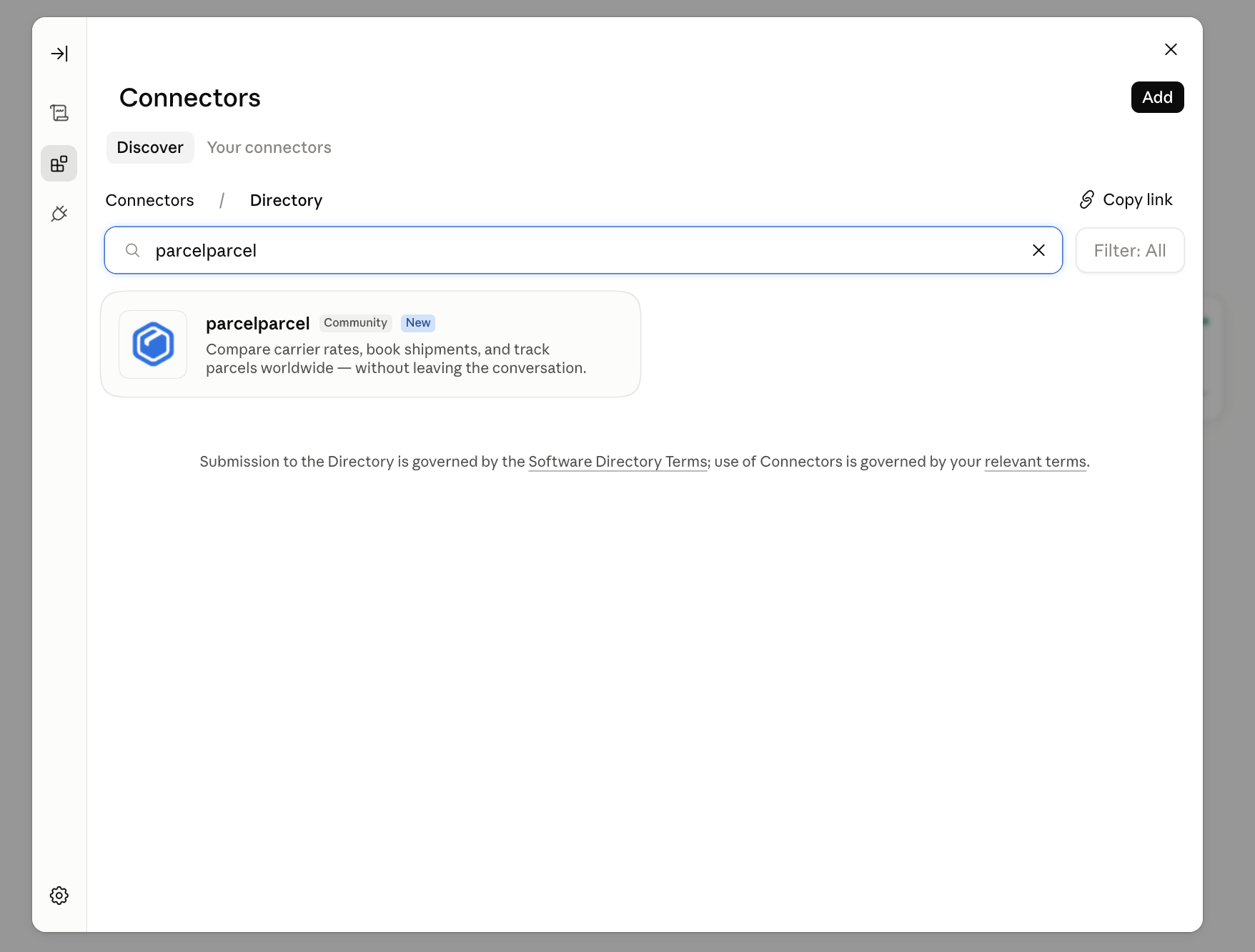
**Fallback: manual setup** *(if ParcelParcel doesn't show up in Discover)*
1. Open Claude and click **Settings**.
2. Go to **Connectors** → **Add custom connector**.
3. Paste `https://services.parcelparcel.com/mcp` and confirm.
4. Log in with your ParcelParcel account and approve access.
## Connect in Claude Code
Add the server from the terminal:
```bash
claude mcp add --transport http parcelparcel https://services.parcelparcel.com/mcp
```
To make it available across all your projects (instead of just the current one), add `--scope user`:
```bash
claude mcp add --transport http parcelparcel https://services.parcelparcel.com/mcp --scope user
```
Run `/mcp` inside a Claude Code session to log in and check that the `parcelparcel` server is connected.
---
Questions, feedback, or something not working? Email [integrations@italogistics.com](mailto:integrations@italogistics.com).
---
Source: https://www.parcelparcel.com/api-docs/webhooks/
# Webhooks
> Get a message on your own URL as soon as a shipment is booked.
`POST https://services.parcelparcel.com/partners-api/v1/hooks/subscribe`
With a webhook we send the details of a shipment to your own URL as soon as it is booked at the carrier, with the tracking number. You don't have to keep asking the API whether something changed.
## Events
| Event | When |
| :--- | :--- |
| `shipment_booked` | A shipment on your account is booked at the carrier and has a tracking number. This includes shipments booked in MyParcelParcel, not only the ones you book through the API. |
Shipments booked with your [sandbox key](https://www.parcelparcel.com/api-docs/authentication/#test-with-your-sandbox-key) are never sent to the carrier, so they don't trigger a webhook. Use the [example payloads](#get-example-payloads) to build and test your receiver.
## Subscribe
Send your URL as `hookUrl`. You get the `id` of the webhook back; keep it if you want to unsubscribe later.
| Name | Value | Required | Comments |
| :--- | :--- | :--- | :--- |
| hookUrl | (string) | true | The URL we send the webhook to, for example `https://example.com/parcelparcel/webhook`. |
### Response
```json
{
"id": 123
}
```
The status code is `201 Created`.
## Unsubscribe
Send a `DELETE` to `/partners-api/v1/hooks/{id}` with the `id` you got when you subscribed. You get `200 OK` back, or `404 Not Found` when there is no webhook with that id on your account.
## Get example payloads
`GET /partners-api/v1/hooks/examples` returns what we would send: the payloads of up to 5 of your most recent booked shipments, or a fixed example when you haven't booked anything yet. Handy to build your receiver before the first real shipment.
## The payload
We send a `POST` with `Content-Type: application/json` to your URL, once per booked shipment. If your URL is down, we don't try again. Use [List your shipments](https://www.parcelparcel.com/api-docs/list-shipments/) to catch up on anything you missed.
| Name | Value | Comments |
| :--- | :--- | :--- |
| Shipment ID | (number) | The same `id` you got when you [created the shipment](https://www.parcelparcel.com/api-docs/create-shipment/). |
| Pickup date | (object or string) | The pickup date and time, or `"No pickup"` if no pickup was scheduled. |
| Reference | (string) | Your own reference. |
| Pick-up Country | (string) | Country name, for example `Netherlands`. |
| Destination Country | (string) | Country name, for example `United States`. |
| Carrier | (string) | Carrier ID, for example `FEDEX`, `DHL` or `UPS`. |
| Product | (string) | The service, for example `FedEx Economy`. |
| Shipping costs (ex. VAT) | (number) | The price in euros, without VAT. |
| Tracking number | (string) | The carrier's tracking number. |
| Tracking number url | (string) | A link to track the shipment. |
| Import/Export | (string) | `Import` or `Export`. |
| Draft Shipment | (bool) | Always `false` for a booked shipment. |
| Incoterms | (string) | `DAP`, `DDP`, or `-` if none was set. |
| Dimensions | (string) | One line per parcel: length × width × height in cm, weight in kg and the number of parcels, for example `84 X 74 X 10 cm + 9.6 kg (1)`. |
| dutiable | (string) | `yes` if the shipment goes through customs with a proforma invoice, otherwise `no`. |
| description | (string) | The description of the contents. |
### Example payload
```json
{
"Shipment ID": 1588448,
"Pickup date": {
"date": "2026-11-05 12:00:00.000000",
"timezone_type": 3,
"timezone": "Europe/Amsterdam"
},
"Reference": "#123126",
"Pick-up Country": "Netherlands",
"Destination Country": "United States",
"Carrier": "FEDEX",
"Product": "FedEx Economy",
"Shipping costs (ex. VAT)": 86.41,
"Tracking number": "6516516533",
"Tracking number url": "https://www.fedex.com/apps/fedextrack/?action=track&trackingnumber=6516516533&cntry_code=nl&locale=nl_NL",
"Import/Export": "Export",
"Draft Shipment": false,
"Incoterms": "DAP",
"Dimensions": "84 X 74 X 10 cm + 9.6 kg (1)",
"dutiable": "yes",
"description": "Awesome Product"
}
```
## Examples
### Request example - Subscribe to booked shipments
```bash cURL
curl --location --request POST 'https://services.parcelparcel.com/partners-api/v1/hooks/subscribe' \
--header 'X-PP-API: {YourAPIKey}@{YourAPISecret}' \
--header 'Content-Type: application/json' \
--data-raw '{
"hookUrl": "https://example.com/parcelparcel/webhook"
}'
```
```http HTTP
POST /partners-api/v1/hooks/subscribe HTTP/1.1
Host: services.parcelparcel.com
X-PP-API: {YourAPIKey}@{YourAPISecret}
Content-Type: application/json
{
"hookUrl": "https://example.com/parcelparcel/webhook"
}
```
### Request example - Get example payloads
```bash cURL
curl --location --request GET 'https://services.parcelparcel.com/partners-api/v1/hooks/examples' \
--header 'X-PP-API: {YourAPIKey}@{YourAPISecret}' \
--header 'Content-Type: application/json'
```
```http HTTP
GET /partners-api/v1/hooks/examples HTTP/1.1
Host: services.parcelparcel.com
X-PP-API: {YourAPIKey}@{YourAPISecret}
Content-Type: application/json
```
### Request example - Unsubscribe webhook 123
```bash cURL
curl --location --request DELETE 'https://services.parcelparcel.com/partners-api/v1/hooks/123' \
--header 'X-PP-API: {YourAPIKey}@{YourAPISecret}' \
--header 'Content-Type: application/json'
```
```http HTTP
DELETE /partners-api/v1/hooks/123 HTTP/1.1
Host: services.parcelparcel.com
X-PP-API: {YourAPIKey}@{YourAPISecret}
Content-Type: application/json
```
Questions about webhooks? Email [integrations@italogistics.com](mailto:integrations@italogistics.com).
---
Source: https://www.parcelparcel.com/api-docs/support/
# Support
> Feel free to contact us with questions or feedback on our API.
If you have any questions or feedback regarding the ParcelParcel API, feel free to contact us by email: [integrations@italogistics.com](mailto:integrations@italogistics.com). You can also consult our live chat through the blue circle in the bottom right corner or through [our website](https://www.parcelparcel.com).
Please don't forget to add your request/response in the attachment if you have questions about specific requests/responses.
---
Source: https://www.parcelparcel.com/api-docs/changelog/
# Changelog
> New endpoints, features and fixes in the ParcelParcel API and MCP server.
What changed in the API, the MCP server and these docs, newest first. Small fixes and internal changes are not listed.
## October 2026
**31 October: new API docs.** The docs moved to [parcelparcel.com/api-docs](https://www.parcelparcel.com/api-docs/), with a ready-to-copy request (cURL, JavaScript, Python) on every endpoint, search, an [OpenAPI 3.1 spec](/api-docs/openapi.json), [llms.txt](/api-docs/llms.txt) for AI agents and a [Postman Collection](https://www.parcelparcel.com/api-docs/postman-collection/) that is generated from the examples. New pages: [Check your API key](https://www.parcelparcel.com/api-docs/me/), [Check if a shipment goes through customs](https://www.parcelparcel.com/api-docs/dutiable-route/) and self-service [webhooks](https://www.parcelparcel.com/api-docs/webhooks/).
**16 October: sandbox key.** Generate a second key pair under Settings > Developers > API keys. Rates, tracking and all other calls use live data, but bookings never go to the carrier: you get a sample label, a `SANDBOX` tracking number and `"sandbox": true`, and nothing is charged. See [Authentication](https://www.parcelparcel.com/api-docs/authentication/#test-with-your-sandbox-key).
**13 October: declared value from the items.** When you create a shipment you no longer have to send a separate total value: we add up the content items (price × quantity).
**12 October: clearer errors on missing data.** [Create a shipment](https://www.parcelparcel.com/api-docs/create-shipment/) now tells you which contact or customs fields are missing, instead of failing at the carrier. Every content item needs a positive quantity. In the MCP server, the assistant asks you for missing contact details instead of filling them in, and `book_shipment` returns the carrier's reason when a booking is refused.
## September 2026
**30 September: shipment id in webhooks.** The [webhook](https://www.parcelparcel.com/api-docs/webhooks/) payload now has `Shipment ID`, the same `id` you got when you created the shipment, so you can match them directly.
**23 September: cancel a shipment.** New endpoint [Cancel a (draft) shipment](https://www.parcelparcel.com/api-docs/cancel-shipment/), also in the MCP server as `cancel_shipment`. Drafts are cancelled in your account; booked shipments are cancelled at the carrier until the parcel is picked up.
**17 September: rates more reliable.** [Compare shipping options](https://www.parcelparcel.com/api-docs/compare-shipping-options/) answers with a `500` error when something goes wrong on our side, and we get an alert so we can fix it.
**4 September: MCP server name per brand.** The MCP server shows up as ParcelParcel or LetMeShip Next in your assistant, depending on the address you connect to.
## August 2026
**27 August: connecting the MCP server.** Connecting from Claude and ChatGPT works on both the ParcelParcel and the LetMeShip Next address.
**14 August: webhooks per account.** You can only unsubscribe webhooks of your own account.
## July 2026
**24 July: duties within the EU.** [Estimate duties/taxes](https://www.parcelparcel.com/api-docs/estimate-duties-taxes/) returns an estimate of 0 for routes within the EU or domestic routes, where no customs apply.
**21 July: tracking links per carrier.** The `trackingUrl` of a shipment now points to the right tracking page of each carrier.
**20 July: only your own account.** The API and the MCP server always work within the account of the user who is logged in or whose key is used.
**16 July: MCP checks the route.** The MCP server knows which fields a route needs (inside or outside the EU, importer address) and asks for them before it makes a draft.
**13 July: estimate duties and taxes.** New endpoint [Estimate duties/taxes](https://www.parcelparcel.com/api-docs/estimate-duties-taxes/), also in the MCP server as `estimate_duties_taxes`.
**9 July: easy MCP connection.** Claude and ChatGPT can register themselves with our MCP server, so you only need the server URL and your ParcelParcel login.
**2–6 July: MCP server.** Launch of the [MCP server](https://www.parcelparcel.com/api-docs/mcp/) (beta) for Claude and ChatGPT: compare rates, create drafts, book, get labels, track and find shipments from the chat. Paid add-ons need your explicit confirmation before booking.
## May 2026
**22 May: list your shipments.** New endpoint [List your shipments](https://www.parcelparcel.com/api-docs/list-shipments/), with filters for status, carrier, countries, booking date and reference or tracking number.
**12 May: pallet rates.** [Compare shipping options](https://www.parcelparcel.com/api-docs/compare-shipping-options/) gives a clear error when `recipientType` is missing for a pallet.
---
Missing something, or want to know when a feature comes? Email [integrations@italogistics.com](mailto:integrations@italogistics.com).