
API docs Endpoints
Create a (draft) shipment
Create a draft shipment or book your shipment directly in ParcelParcel.
https://services.parcelparcel.com/partners-api/v1/shipmentsExample request
Parcel shipment from the Netherlands to France More examples
curl --request POST 'https://services.parcelparcel.com/partners-api/v1/shipments' \
  --header 'X-PP-API: {YourAPIKey}@{YourAPISecret}' \
  --header 'Content-Type: application/json' \
  --data '{
  "parcels": [
    {
      "type": "NONDOC",
      "weight": "20",
      "height": "10",
      "width": "74",
      "length": "84",
      "count": "1"
    }
  ],
  "contentItems": [
    {
      "description": "This is a description of an content item",
      "quantity": "1",
      "price": "1600.00",
      "country": "NL"
    },
    {
      "description": "This is a description of an content item",
      "quantity": "1",
      "price": "1600.00",
      "country": "NL",
      "hsCode": "61091000"
    }
  ],
  "reasonForExport": "commercial",
  "reference": "#123126",
  "currency": "EUR",
  "incoterms": "DAP",
  "pickupAddress": {
    "countryCode": "NL",
    "companyName": "ParcelParcel",
    "contactPerson": "John Doe",
    "email": "[email protected]",
    "phone": "+31858771656",
    "addressLine1": "Energiestraat 14E",
    "addressLine2": "Extra details-",
    "zipcode": "1411 AT",
    "city": "Naarden"
  },
  "destinationAddress": {
    "countryCode": "FR",
    "companyName": "Company x",
    "contactPerson": "John Croissant",
    "email": "[email protected]",
    "phone": "+5218112278399",
    "addressLine1": "Rue de Baquette 34",
    "addressLine2": "Dans la rue",
    "zipcode": "75001",
    "vatNumber": "0000",
    "city": "Paris"
  },
  "schedulePickup": 1,
  "pickupDate": "2026-11-05",
  "pickupTimeFrom": "12:00",
  "pickupTimeTo": "16:00",
  "pickupInstructions": "Ring the bell",
  "insured": 0
}'
{
"parcels": [
{
"type": "NONDOC",
"weight": "20",
"height": "10",
"width": "74",
"length": "84",
"count": "1"
}
],
"contentItems": [
{
"description": "This is a description of an content item",
"quantity": "1",
"price": "1600.00",
"country": "NL"
},
{
"description": "This is a description of an content item",
"quantity": "1",
"price": "1600.00",
"country": "NL",
"hsCode": "61091000"
}
],
"reasonForExport": "commercial",
"reference": "#123126",
"currency": "EUR",
"incoterms": "DAP",
"pickupAddress": {
"countryCode": "NL",
"companyName": "ParcelParcel",
"contactPerson": "John Doe",
"email": "[email protected]",
"phone": "+31858771656",
"addressLine1": "Energiestraat 14E",
"addressLine2": "Extra details-",
"zipcode": "1411 AT",
"city": "Naarden"
},
"destinationAddress": {
"countryCode": "FR",
"companyName": "Company x",
"contactPerson": "John Croissant",
"email": "[email protected]",
"phone": "+5218112278399",
"addressLine1": "Rue de Baquette 34",
"addressLine2": "Dans la rue",
"zipcode": "75001",
"vatNumber": "0000",
"city": "Paris"
},
"schedulePickup": 1,
"pickupDate": "2026-11-05",
"pickupTimeFrom": "12:00",
"pickupTimeTo": "16:00",
"pickupInstructions": "Ring the bell",
"insured": 0
}const response = await fetch("https://services.parcelparcel.com/partners-api/v1/shipments", {
method: "POST",
headers: {
"X-PP-API": "{YourAPIKey}@{YourAPISecret}",
"Content-Type": "application/json",
},
body: JSON.stringify({
"parcels": [
{
"type": "NONDOC",
"weight": "20",
"height": "10",
"width": "74",
"length": "84",
"count": "1"
}
],
"contentItems": [
{
"description": "This is a description of an content item",
"quantity": "1",
"price": "1600.00",
"country": "NL"
},
{
"description": "This is a description of an content item",
"quantity": "1",
"price": "1600.00",
"country": "NL",
"hsCode": "61091000"
}
],
"reasonForExport": "commercial",
"reference": "#123126",
"currency": "EUR",
"incoterms": "DAP",
"pickupAddress": {
"countryCode": "NL",
"companyName": "ParcelParcel",
"contactPerson": "John Doe",
"email": "[email protected]",
"phone": "+31858771656",
"addressLine1": "Energiestraat 14E",
"addressLine2": "Extra details-",
"zipcode": "1411 AT",
"city": "Naarden"
},
"destinationAddress": {
"countryCode": "FR",
"companyName": "Company x",
"contactPerson": "John Croissant",
"email": "[email protected]",
"phone": "+5218112278399",
"addressLine1": "Rue de Baquette 34",
"addressLine2": "Dans la rue",
"zipcode": "75001",
"vatNumber": "0000",
"city": "Paris"
},
"schedulePickup": 1,
"pickupDate": "2026-11-05",
"pickupTimeFrom": "12:00",
"pickupTimeTo": "16:00",
"pickupInstructions": "Ring the bell",
"insured": 0
}),
});
const data = await response.json();
console.log(data);import requests
response = requests.post(
"https://services.parcelparcel.com/partners-api/v1/shipments",
headers={
"X-PP-API": "{YourAPIKey}@{YourAPISecret}",
"Content-Type": "application/json",
},
json={
"parcels": [
{
"type": "NONDOC",
"weight": "20",
"height": "10",
"width": "74",
"length": "84",
"count": "1",
},
],
"contentItems": [
{
"description": "This is a description of an content item",
"quantity": "1",
"price": "1600.00",
"country": "NL",
},
{
"description": "This is a description of an content item",
"quantity": "1",
"price": "1600.00",
"country": "NL",
"hsCode": "61091000",
},
],
"reasonForExport": "commercial",
"reference": "#123126",
"currency": "EUR",
"incoterms": "DAP",
"pickupAddress": {
"countryCode": "NL",
"companyName": "ParcelParcel",
"contactPerson": "John Doe",
"email": "[email protected]",
"phone": "+31858771656",
"addressLine1": "Energiestraat 14E",
"addressLine2": "Extra details-",
"zipcode": "1411 AT",
"city": "Naarden",
},
"destinationAddress": {
"countryCode": "FR",
"companyName": "Company x",
"contactPerson": "John Croissant",
"email": "[email protected]",
"phone": "+5218112278399",
"addressLine1": "Rue de Baquette 34",
"addressLine2": "Dans la rue",
"zipcode": "75001",
"vatNumber": "0000",
"city": "Paris",
},
"schedulePickup": 1,
"pickupDate": "2026-11-05",
"pickupTimeFrom": "12:00",
"pickupTimeTo": "16:00",
"pickupInstructions": "Ring the bell",
"insured": 0,
},
)
print(response.json())Tip: copy the cURL and paste it in Postman under Import, or straight into the URL bar of a new request. Postman fills in the method, headers and body for you. Replace {YourAPIKey}@{YourAPISecret} with your own API key and secret (use your sandbox key while testing), or import the whole Postman Collection.
This endpoint allows you to create draft shipments or book shipments directly. These shipments will be visible in the API shipments section in your ParcelParcel account if you create them as a draft.
If you successfully created the draft shipment, it will look like this:
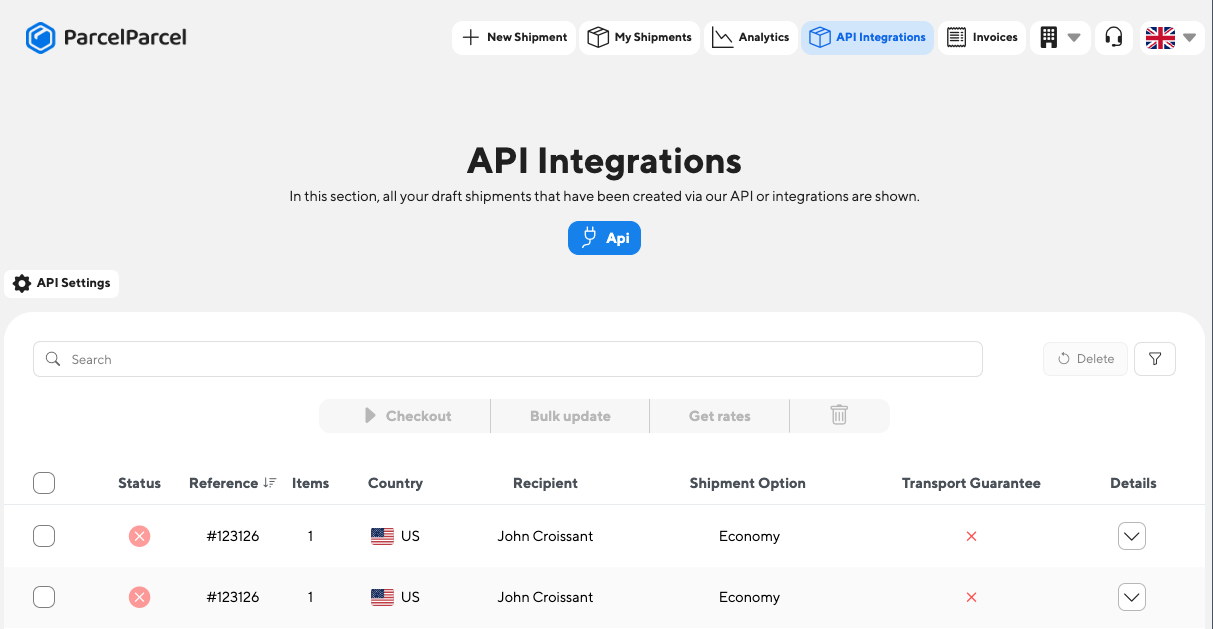
If you decide to create a draft shipment, you can still edit all the information of your draft shipment and decide to book the shipment to get the labels in API shipments. The bookShipment element in the body defines if you just want to create a draft or want to book it directly. If you book the shipment directly, you will also receive the labels in the response.
Header
You need to add the following headers:
| Name | Value |
|---|---|
Content-Type | application/json |
X-PP-API | {YourAPIKey}@{YourAPISecret} |
Don't you have an API Key and API Secret yet? Check our Authentication page and how to get them in under a minute.
Body
The Request body must contain a JSON structure with the following definition
| Name | Value | Required | Comments |
|---|---|---|---|
reference | (string) | optional | |
currency | (string) EUR | USD | required | |
insured | (bool) | optional | Insure the shipment. If you leave it out, the shipment is not insured. |
preferredShippingOption | (number) | optional | If you want to create a draft shipment with a specific shipping option, you can set the productId through this element. The productId is acquired from the response when you use our compare shipping options endpoint. If you don't specify this element, we select the cheapest shipping option by default. |
schedulePickup | (bool) | optional | Set to true if the carrier should pick up the shipment. The pickup fields below are only used when this is true. |
pickupDate | (string) YYYY-MM-DD | optional | The date the carrier picks up the shipment, for example "2026-11-05". If you leave it out, we use today's date. |
pickupTimeFrom | (string) | optional | For example "12:00". If you leave it out, we use "12:00". |
pickupTimeTo | (string) | optional | For example "16:00". If you leave it out, we use "17:30". |
pickupInstructions | (string) | optional | |
reasonForExport | (string) Available options: • commercial • replacement • sample • gift • repair • return • personal_use • personal_effect • intercompany • exhibition | required (if dutiable shipment) | |
incoterms | (string) DAP || DDP | required (if dutiable shipment) | |
parcels | (object array) Parcel | ||
contentItems | (object array) ContentItem | required must have at least one item | |
pickupAddress | (object) Address | required | |
destinationAddress | (object) Address | required | |
bookShipment | (bool) | optional | You can put this to true and we will try the book the shipment directly. With your sandbox key, the booking is never sent to the carrier: you get a sample label and a test tracking number. If you put this to false, or don't add, we will just create the draft which will be visible in "API shipments" in your account. If you don't specify this element, we will put the value by default to "false". |
inlineLabel | (bool) | optional | This returns the complete shipping documentation (base64) in the response. This element is only used when bookShipment is set to "true". The default value of "inlineLabel" is set to "true". |
ContentItem type
| Name | Value | Required | Comments |
|---|---|---|---|
description | (string) | required | The description of an item. Make sure you describe your item well (e.g. 100% cotton white T-shirt Male") |
quantity | number | required | The number of pieces you have of this item |
price | (float) 2 digits | required | The price per item |
country | 2-digit ISO code | required | The country where the item is manufactured |
hsCode | (string) | optional | You can specify an HS code per item |
Example:
{
"description": "awesome product ",
"quantity": "1",
"price": "69.00",
"country": "NL",
"hsCode": "61091000"
}Parcel type
| Name | Value | Required | Comments |
|---|---|---|---|
type | NONDOC | required | You should choose NONDOC if you're shipping a parcel |
weight | 1 decimal | required | For example "10" or "15.2". This value should be stated in kilograms (kg). |
length | integer | required | For example "40". This value should be stated in centimetres (cm). |
width | integer | required | For example "30". This value should be stated in centimetres (cm). |
height | integer | required | For example "40". This value should be stated in centimetres (cm). |
count | integer | required | For example "1" |
Example NONDOC (Parcel)
{
"type": "NONDOC",
"weight": "8.3",
"height": "21",
"width": "25",
"length": "65",
"count": "1"
}Address type
| Name | Value | Required | Comments |
|---|---|---|---|
countryCode | (string) | required | You should provide the country is ISO-2 format (e.g. NL or US) |
companyName | (string) | optional | |
contactPerson | (string) | required | |
email | (email) | required | |
phone | (string) | required | |
addressLine1 | (string) | required | We have some logic regarding the addressLine1 and Addressline2 fields. We first concatenate addressline1 with addressline2. Then we split into max allowed chars for address line 1 and put the remaining into address line 2. |
addressLine2 | (string) | optional | We have some logic regarding the addressLine1 and Addressline2 fields. We first concatenate addressline1 with addressline2. Then we split into max allowed chars for address line 1 and put the remaining into address line 2. |
zipcode | (string) | required | |
city | (string) | required | |
vatNumber | (string) | optional | The VAT number is only required for shipments to the US that are to a company and/or if the total value of the shipment is more than €2300. |
sendNotification | (bool) | optional | This element can only be set for the destinationAddress and sends out a notification email from ParcelParcel to the recipient email whenever the shipment is in transit. You can read more about this functionality on this page. This email contains also the Track & Trace number and a tracking link. If you don't set this element, the default value is false. |
Example:
{
"countryCode": "FR",
"companyName": "My Company",
"contactPerson": "John Doe",
"email": "[email protected]",
"phone": "+31855871656",
"addressLine1": "street Name and numer for instance",
"addressLine2": "Extra details",
"zipcode": "75001",
"city": "Paris",
"vatNumber": "0000"
}Examples
Below, we have created multiple examples so that you are up and running ASAP. Don't know how to test these requests? Check our guide.
Request example - Parcel shipment from the Netherlands to France
curl --location --request POST 'https://services.parcelparcel.com/partners-api/v1/shipments' \
--header 'X-PP-API: {YourAPIKey}@{YourAPISecret}' \
--header 'Content-Type: application/json' \
--data-raw '{
"parcels": [
{
"type": "NONDOC",
"weight": "20",
"height": "10",
"width": "74",
"length": "84",
"count": "1"
}
],
"contentItems": [
{
"description": "This is a description of an content item",
"quantity": "1",
"price": "1600.00",
"country": "NL"
},
{
"description": "This is a description of an content item",
"quantity": "1",
"price": "1600.00",
"country": "NL",
"hsCode": "61091000"
}
],
"reasonForExport": "commercial",
"reference": "#123126",
"currency": "EUR",
"incoterms": "DAP",
"pickupAddress": {
"countryCode": "NL",
"companyName": "ParcelParcel",
"contactPerson": "John Doe",
"email": "[email protected]",
"phone": "+31858771656",
"addressLine1": "Energiestraat 14E",
"addressLine2": "Extra details-",
"zipcode": "1411 AT",
"city": "Naarden"
},
"destinationAddress": {
"countryCode": "FR",
"companyName": "Company x",
"contactPerson": "John Croissant",
"email": "[email protected]",
"phone": "+5218112278399",
"addressLine1": "Rue de Baquette 34",
"addressLine2": "Dans la rue",
"zipcode": "75001",
"vatNumber": "0000",
"city": "Paris"
},
"schedulePickup": 1,
"pickupDate": "2026-11-05",
"pickupTimeFrom": "12:00",
"pickupTimeTo": "16:00",
"pickupInstructions": "Ring the bell",
"insured": 0
}'POST /partners-api/v1/shipments HTTP/1.1
Host: services.parcelparcel.com
X-PP-API: {YourAPIKey}@{YourAPISecret}
Content-Type: application/json
{
  "parcels": [
    {
      "type": "NONDOC",
      "weight": "20",
      "height": "10",
      "width": "74",
      "length": "84",
      "count": "1"
    }
  ],
  "contentItems": [
    {
      "description": "This is a description of an content item",
      "quantity": "1",
      "price": "1600.00",
      "country": "NL"
    },
    {
      "description": "This is a description of an content item",
      "quantity": "1",
      "price": "1600.00",
      "country": "NL",
      "hsCode": "61091000"
    }
  ],
  "reasonForExport": "commercial",
  "reference": "#123126",
  "currency": "EUR",
  "incoterms": "DAP",
  "pickupAddress": {
    "countryCode": "NL",
    "companyName": "ParcelParcel",
    "contactPerson": "John Doe",
    "email": "[email protected]",
    "phone": "+31858771656",
    "addressLine1": "Energiestraat 14E",
    "addressLine2": "Extra details-",
    "zipcode": "1411 AT",
    "city": "Naarden"
  },
  "destinationAddress": {
    "countryCode": "FR",
    "companyName": "Company x",
    "contactPerson": "John Croissant",
    "email": "[email protected]",
    "phone": "+5218112278399",
    "addressLine1": "Rue de Baquette 34",
    "addressLine2": "Dans la rue",
    "zipcode": "75001",
    "vatNumber": "0000",
    "city": "Paris"
  },
  "schedulePickup": 1,
  "pickupDate": "2026-11-05",
  "pickupTimeFrom": "12:00",
  "pickupTimeTo": "16:00",
  "pickupInstructions": "Ring the bell",
  "insured": 0
}{
"parcels": [
{
"type": "NONDOC",
"weight": "20",
"height": "10",
"width": "74",
"length": "84",
"count": "1"
}
],
"contentItems": [
{
"description": "This is a description of an content item",
"quantity": "1",
"price": "1600.00",
"country": "NL"
},
{
"description": "This is a description of an content item",
"quantity": "1",
"price": "1600.00",
"country": "NL",
"hsCode": "61091000"
}
],
"reasonForExport": "commercial",
"reference": "#123126",
"currency": "EUR",
"incoterms": "DAP",
"pickupAddress": {
"countryCode": "NL",
"companyName": "ParcelParcel",
"contactPerson": "John Doe",
"email": "[email protected]",
"phone": "+31858771656",
"addressLine1": "Energiestraat 14E",
"addressLine2": "Extra details-",
"zipcode": "1411 AT",
"city": "Naarden"
},
"destinationAddress": {
"countryCode": "FR",
"companyName": "Company x",
"contactPerson": "John Croissant",
"email": "[email protected]",
"phone": "+5218112278399",
"addressLine1": "Rue de Baquette 34",
"addressLine2": "Dans la rue",
"zipcode": "75001",
"vatNumber": "0000",
"city": "Paris"
},
"schedulePickup": 1,
"pickupDate": "2026-11-05",
"pickupTimeFrom": "12:00",
"pickupTimeTo": "16:00",
"pickupInstructions": "Ring the bell",
"insured": 0
}Don't forget to change the X-PP-API element in the header in order for this request to work. Don't know where to get your API Key and API Secret? Check our Authentication page and how to get them in under a minute.
Response example - Parcel shipment from the Netherlands to France
{
  "errors": false,
  "message": "Your draft shipment is successfully created in your API shipments section",
  "data": {
    "id": 1
  }
}Request example - Parcel shipment from the Netherlands to the United States
curl --location --request POST 'https://services.parcelparcel.com/partners-api/v1/shipments' \
--header 'X-PP-API: {YourAPIKey}@{YourAPISecret}' \
--header 'Content-Type: application/json' \
--data-raw '{
  "parcels": [
    {
      "type": "NONDOC",
      "weight": "9.6",
      "height": "10",
      "width": "74",
      "length": "84",
      "count": "1"
    }
  ],
  "contentItems": [
    {
      "description": "Awesome Product",
      "quantity": "1",
      "price": "69.00",
      "hsCode": "61091000",
      "country": "NL"
    }
  ],
  "reasonForExport": "commercial",
  "reference": "#123126",
  "currency": "EUR",
  "incoterms": "DAP",
  "pickupAddress": {
    "countryCode": "NL",
    "companyName": "CompanyOne",
    "contactPerson": "John Doe 1",
    "email": "[email protected]",
    "phone": "+31858771656",
    "addressLine1": "street Name ...",
    "addressLine2": "extra details",
    "zipcode": "3542 AB",
    "city": "Utrecht"
  },
  "destinationAddress": {
    "countryCode": "US",
    "companyName": "CompanyTwo",
    "contactPerson": "John Doe",
    "email": "[email protected]",
    "phone": "+31858771656",
    "addressLine1": "street Name ...",
    "addressLine2": "Dover market",
    "zipcode": "10001",
    "vatNumber": "0000",
    "city": "New York"
  },
  "schedulePickup": 1,
  "pickupDate": "2026-11-05",
  "pickupTimeFrom": "12:00",
  "pickupTimeTo": "16:00",
  "pickupInstructions": "Ring the bell",
  "insured": 0
}'
POST /partners-api/v1/shipments HTTP/1.1
Host: services.parcelparcel.com
X-PP-API: {YourAPIKey}@{YourAPISecret}
Content-Type: application/json
{
"parcels": [
{
"type": "NONDOC",
"weight": "9.6",
"height": "10",
"width": "74",
"length": "84",
"count": "1"
}
],
"contentItems": [
{
"description": "Awesome Product",
"quantity": "1",
"price": "69.00",
"hsCode": "61091000",
"country": "NL"
}
],
"reasonForExport": "commercial",
"reference": "#123126",
"currency": "EUR",
"incoterms": "DAP",
"pickupAddress": {
"countryCode": "NL",
"companyName": "CompanyOne",
"contactPerson": "John Doe 1",
"email": "[email protected]",
"phone": "+31858771656",
"addressLine1": "street Name ...",
"addressLine2": "extra details",
"zipcode": "3542 AB",
"city": "Utrecht"
},
"destinationAddress": {
"countryCode": "US",
"companyName": "CompanyTwo",
"contactPerson": "John Doe",
"email": "[email protected]",
"phone": "+52....",
"addressLine1": "street Name ...",
"addressLine2": "Dover market",
"zipcode": "10001",
"vatNumber": "0000",
"city": "New York"
},
"schedulePickup": 1,
"pickupDate": "2026-11-05",
"pickupTimeFrom": "12:00",
"pickupTimeTo": "16:00",
"pickupInstructions": "Ring the bell",
"insured": 0
}{
"parcels": [
{
"type": "NONDOC",
"weight": "9.6",
"height": "10",
"width": "74",
"length": "84",
"count": "1"
}
],
"contentItems": [
{
"description": "Awesome Product",
"quantity": "1",
"price": "69.00",
"hsCode": "61091000",
"country": "NL"
}
],
"reasonForExport": "commercial",
"reference": "#123126",
"currency": "EUR",
"incoterms": "DAP",
"pickupAddress": {
"countryCode": "NL",
"companyName": "CompanyOne",
"contactPerson": "John Doe 1",
"email": "[email protected]",
"phone": "+31858771656",
"addressLine1": "street Name ...",
"addressLine2": "extra details",
"zipcode": "3542 AB",
"city": "Utrecht"
},
"destinationAddress": {
"countryCode": "US",
"companyName": "CompanyTwo",
"contactPerson": "John Doe",
"email": "[email protected]",
"phone": "+31858771656",
"addressLine1": "street Name ...",
"addressLine2": "Dover market",
"zipcode": "10001",
"vatNumber": "0000",
"city": "New York"
},
"schedulePickup": 1,
"pickupDate": "2026-11-05",
"pickupTimeFrom": "12:00",
"pickupTimeTo": "16:00",
"pickupInstructions": "Ring the bell",
"insured": 0
}Don't forget to change the X-PP-API element in the header in order for this request to work. Don't know where to get your API Key and API Secret? Check our Authentication page and how to get them in under a minute.
Response example - Parcel draft shipment from the Netherlands to the United States
{
  "errors": false,
  "message": "Your draft shipment is successfully created in your API shipments section",
  "data": {
    "id": 1
  }
}Request example - Parcel shipment (booked directly) from the Netherlands to the United States
{
  "parcels": [
    {
      "type": "NONDOC",
      "weight": "9.6",
      "height": "10",
      "width": "74",
      "length": "84",
      "count": "1"
    }
  ],
  "contentItems": [
    {
      "description": "Awesome Product",
      "quantity": "1",
      "price": "69.00",
      "hsCode": "61091000",
      "country": "NL"
    }
  ],
  "reasonForExport": "commercial",
  "reference": "#123126",
  "currency": "EUR",
  "incoterms": "DAP",
  "pickupAddress": {
    "countryCode": "NL",
    "companyName": "CompanyOne",
    "contactPerson": "John Doe 1",
    "email": "[email protected]",
    "phone": "+31858771656",
    "addressLine1": "street Name ...",
    "addressLine2": "extra details",
    "zipcode": "3542 AB",
    "city": "Utrecht"
  },
  "destinationAddress": {
    "countryCode": "US",
    "companyName": "CompanyTwo",
    "contactPerson": "John Doe",
    "email": "[email protected]",
    "phone": "+31858771656",
    "addressLine1": "street Name ...",
    "addressLine2": "Dover market",
    "zipcode": "10001",
    "vatNumber": "0000",
    "city": "New York"
  },
  "insured": 0,
  "bookShipment": true
}
The bookShipment element in the body defines if you just want to create a draft or want to book it directly. If you book the shipment directly, you will also receive the labels in the response.
Response example - Parcel shipment (booked directly) from the Netherlands to the United States
{
  "errors": [],
  "message": "Your shipment has been booked",
  "data": {
    "id": 1588448,
    "status": "created_at_carrier",
    "carrier": "FedEx",
    "product": "FedEx - FedEx Economy",
    "productId": 79,
    "price": 86.41,
    "trackingNumber": "6516516533",
    "trackingUrl": "https://www.fedex.com/apps/fedextrack/?action=track&trackingnumber=6516516533&cntry_code=nl&locale=nl_NL",
    "labels": "=== base64 encoded label ==="
  }
}